Cyberattacks can happen without warning. A suspicious email, stolen password, infected computer, or unusual network connection can put important business information at risk. Without proper security measures, a small problem can turn into a serious data breach.
Detection and response helps organizations find these threats, investigate suspicious activity, and take action before attackers cause more damage. It combines security software, monitoring systems, and trained professionals to protect computers, networks, applications, and sensitive information.
In this guide, you will learn what detection and response means, how it works, which security tools businesses use, and how organizations can build a better cybersecurity plan.
What Is Detection and Response in Cybersecurity?
Detection and response is a cybersecurity process that helps organizations identify possible cyber threats and take action to stop or reduce their impact.
It has two main parts:
- Detection: Finding suspicious activity, malware, unauthorized access, and other signs of a cyberattack.
- Response: Investigating the problem, stopping the threat, removing harmful files, and restoring affected systems.
Together, these activities help security teams find attacks and deal with them before they cause serious harm.
For example, a company might receive an alert that an employee’s account has logged in from an unfamiliar location. Its security team can investigate the login, check for suspicious activity, and block access if the account appears compromised.
Example 1:
A company receives an alert showing that an employee’s account has attempted to access sensitive files from an unfamiliar device. The security team checks the login, blocks suspicious access, and resets the employee’s password.
This example shows how threat detection and response can help stop unauthorized access before more company information is exposed.
Detection and response is also known as threat detection and response (TDR). It can use several security technologies, including EDR, XDR, NDR, and SIEM.
How Does Detection and Response Work?
Detection and response follows a series of steps. Each step helps security professionals find, investigate, and handle possible cyberattacks.

The exact process can differ between organizations, but most security teams follow these main stages.
1. Continuous Security Monitoring
The first step is monitoring computers, networks, servers, applications, and user accounts.
Security software collects information about system activity. It looks for unusual behavior, suspicious connections, unauthorized access, and signs of malware.
For example, a monitoring system might notice that an employee’s account is downloading hundreds of files within a few minutes.
Example 2:
A business notices that one employee’s computer is sending large amounts of data to an unfamiliar external server late at night. Its monitoring software creates a security alert for investigation.
This alert gives the security team a chance to check whether the activity is normal or connected to a possible data theft attempt.
2. Threat Detection
After collecting system information, security tools analyze it to identify possible threats.
They may use:
- Signature-based detection: Identifies known malware using its digital patterns or signatures.
- Behavior-based detection: Looks for actions commonly linked to cyberattacks.
- Anomaly-based detection: Finds activity that differs from normal user or system behavior.
- Threat intelligence: Uses information about known attackers, malware, and attack methods to identify possible risks.
These methods can work together to identify both known and unfamiliar threats.
3. Alert Investigation
Not every security alert means an attack has happened.
Security professionals investigate alerts to find out what caused them. They review system logs, user activity, network connections, and other available information.
They also decide how serious the issue is and which systems may be affected.
Example 3:
A security tool reports several failed login attempts on a company server. An analyst checks the account history and discovers that an unknown person has been trying different passwords.
The analyst can now classify the activity as a possible brute-force attack and take steps to protect the account.
4. Threat Containment

Once the team confirms a threat, it works to stop the attack from spreading.
Possible actions include:
- Disconnecting an infected computer from the network.
- Blocking suspicious internet connections.
- Locking compromised user accounts.
- Ending unauthorized login sessions.
- Blocking harmful files or applications.
- Restricting access to sensitive information.
The goal is to limit the damage while the investigation continues.
5. Threat Removal
Containment stops the immediate threat from spreading, but it does not always remove the original cause.
The security team must find and remove harmful software, unauthorized accounts, malicious scripts, and other parts of the attack.
It may also fix software weaknesses that allowed the attacker to enter the system.
6. System Recovery
After removing the threat, the organization begins restoring affected systems.
This may include:
- Restoring clean files from backups.
- Reinstalling affected software.
- Resetting passwords.
- Updating security settings.
- Checking systems for remaining threats.
- Testing devices before reconnecting them.
Recovery should happen only after the security team has checked that the main threat has been removed.
7. Reporting and Prevention
The final step is reviewing what happened and recording the results.
Security teams document the attack, affected systems, actions taken, and lessons learned.
They can then improve security policies, update monitoring rules, train employees, and strengthen weak areas.
This helps reduce the chances of a similar attack happening again.
Why Is Detection and Response Important?
Cyberattacks can affect businesses of every size. A single compromised account can expose customer information, disrupt business operations, or give attackers access to important systems.
Detection and response helps organizations deal with these risks by finding suspicious activity and supporting quick action.
Here are some of its main benefits.
1. Finds Threats Earlier
Security monitoring helps identify unusual activity before an issue becomes a larger incident.
For example, a system may detect repeated login attempts or an unexpected software installation. Security professionals can investigate these signs before an attacker gains greater access.
2. Reduces Security Damage
A quick response can limit how much damage an attack causes.
Security teams can isolate infected computers, block harmful connections, and disable compromised accounts.
This can help protect other devices and sensitive business information.
3. Protects Important Business Data
Organizations store valuable information, including:
- Customer details.
- Employee records.
- Financial information.
- Business documents.
- Login credentials.
- Company records.
Detection and response helps protect this information by identifying unauthorized access and suspicious data transfers.
4. Reduces Business Downtime
Cyberattacks can interrupt normal business activities.
For example, ransomware may prevent employees from opening important files. A security team can investigate the attack, isolate affected systems, and begin recovery.
A well-prepared response plan can help reduce the time needed to restore normal operations.
5. Improves Security Awareness
Security teams can use incident reports to identify weak areas.
For example, if several employees click suspicious email links, the company may need better email protection and employee training.
6. Supports Security and Compliance Efforts
Many organizations must follow rules for protecting personal and business information.
Detection and response can support these efforts by helping organizations monitor systems, investigate security events, and maintain incident records.
However, using detection tools alone does not guarantee compliance. Organizations must also follow the specific rules that apply to their industry and location.
Common Types of Detection and Response
There are several types of detection and response technologies. Each one focuses on a different part of an organization’s IT environment.
1. Endpoint Detection and Response (EDR)
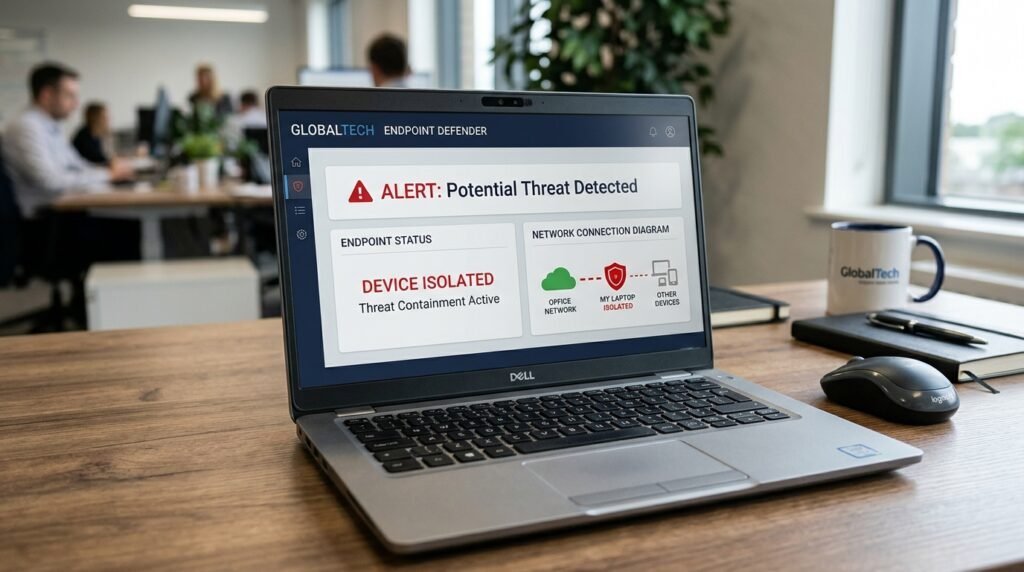
Endpoint Detection and Response (EDR) monitors individual devices, such as:
- Desktop computers.
- Laptops.
- Servers.
- Workstations.
- Supported mobile devices.
EDR software collects activity data and looks for suspicious behavior. It can alert security teams and support actions such as isolating an infected device.
Example 4:
An employee downloads a file that contains malware. The company’s EDR software detects suspicious activity and isolates the affected laptop from the business network.
This helps prevent the infected device from becoming a source of further attacks.
2. Extended Detection and Response (XDR)
Extended Detection and Response (XDR) collects and analyzes security information from several areas of an organization’s IT environment.
These may include:
- Endpoints.
- Networks.
- Cloud services.
- Email systems.
- User identities.
- Business applications.
XDR connects information from different sources to give security teams a broader view of suspicious activity.
For example, an XDR platform may connect an unusual email attachment, a suspicious login, and unexpected computer activity to identify signs of one larger attack.
3. Managed Detection and Response (MDR)
Managed Detection and Response (MDR) is a cybersecurity service provided by an outside security company.
An MDR provider uses security tools and trained professionals to monitor, investigate, and respond to threats for its customers.
This option can help businesses that do not have enough in-house security staff.
Services vary by provider. Some offer continuous monitoring and active threat containment, while others have different response limits based on the service agreement.
4. Network Detection and Response (NDR)
Network Detection and Response (NDR) focuses on network traffic.
It monitors communication between computers, servers, cloud systems, and other connected devices.
NDR tools look for suspicious traffic patterns, unusual connections, and signs that attackers may be moving through a network.
Example 5:
An NDR system notices that a company computer is communicating with an unfamiliar server and sending unusual amounts of data. The security team investigates the connection and blocks it if it is harmful.
This helps organizations identify threats that may not be visible through endpoint monitoring alone.
5. Cloud Detection and Response (CDR)
Cloud Detection and Response (CDR) focuses on identifying security threats in cloud environments.
It may monitor:
- Cloud storage.
- Virtual machines.
- Cloud applications.
- User permissions.
- Cloud network activity.
- Access to cloud databases.
For example, a company may receive an alert when an unknown user attempts to access a cloud storage account with sensitive business files.
6. Identity Threat Detection and Response (ITDR)
Identity Threat Detection and Response (ITDR) focuses on protecting digital identities and access systems.
It helps identify suspicious login activity, stolen credentials, unauthorized account changes, and attempts to gain higher access permissions.
For example, an ITDR system may detect that an employee account is trying to access administrative settings that the employee does not normally use.
What Is the Difference Between Detection and Response?
Detection and response are connected, but they perform different jobs.
Detection focuses on finding possible threats. Response focuses on investigating and handling those threats.
| Detection | Response |
|---|---|
| Finds suspicious activity | Takes action against threats |
| Monitors system behavior | Contains security incidents |
| Creates security alerts | Investigates security alerts |
| Identifies possible attacks | Removes harmful activity |
| Helps locate weaknesses | Helps restore affected systems |
Example 6:
A security system detects an unknown login attempt on a business account. The response team investigates the login, blocks unauthorized access, and secures the account.
Detection identifies the possible problem, while response helps resolve it.
Both are needed for an effective cybersecurity program.
Detection and Response vs. EDR, XDR, and MDR
These terms are closely related, but they do not mean the same thing.
| Term | Full Form | Main Purpose |
|---|---|---|
| TDR | Threat Detection and Response | Identifies and handles cyber threats |
| EDR | Endpoint Detection and Response | Protects individual devices |
| XDR | Extended Detection and Response | Connects security information across multiple systems |
| MDR | Managed Detection and Response | Provides security monitoring and response as a service |
| NDR | Network Detection and Response | Monitors network activity |
| ITDR | Identity Threat Detection and Response | Protects user identities and access systems |
Which One Should a Business Choose?
The right option depends on the company’s size, security needs, budget, and available staff.
- Small businesses: May benefit from managed security services if they lack an internal security team.
- Medium-sized businesses: May use EDR or XDR to monitor computers, accounts, and business applications.
- Large organizations: May combine EDR, XDR, NDR, SIEM, and internal security operations.
- Cloud-based businesses: May need cloud and identity monitoring alongside endpoint security.
These technologies can work together. They are not always direct replacements for one another.
Common Tools Used for Detection and Response
Organizations use different security tools to monitor activity, collect information, investigate alerts, and respond to attacks.
Here are some common categories.
1. Security Information and Event Management (SIEM)
Security Information and Event Management (SIEM) software collects and analyzes security logs from different systems.
It can help security teams identify unusual activity by connecting information from multiple sources.
For example, a SIEM platform may combine login records, firewall alerts, and server activity to help identify a possible account compromise.
2. Security Orchestration, Automation, and Response (SOAR)
Security Orchestration, Automation, and Response (SOAR) tools help automate parts of security operations.
They can perform tasks such as:
- Collecting information about alerts.
- Creating incident records.
- Sending notifications.
- Blocking known harmful indicators.
- Assigning incidents to security staff.
- Running approved response steps.
Automation can save time, but important actions should have proper approval and safeguards.
3. Endpoint Security Software
Endpoint security software helps protect computers and other connected devices.
Depending on the product, it may include malware detection, suspicious activity monitoring, device isolation, and investigation features.
4. Firewall Systems
A firewall controls network traffic based on security rules.
It can block unwanted connections and restrict access to certain network resources.
Firewalls are useful for network protection, but they should work alongside other security tools.
5. Threat Intelligence Platforms
Threat intelligence provides information about known cyber threats, suspicious internet addresses, harmful files, and attacker methods.
Security teams use this information to improve detection rules and investigate possible attacks.
What Is a Security Operations Center (SOC)?
A Security Operations Center (SOC) is a team or department responsible for monitoring an organization’s cybersecurity.
A SOC may work inside a company or operate through an outside service provider.
Its main responsibilities include:
- Monitoring security alerts.
- Investigating suspicious activity.
- Identifying cyber threats.
- Managing security incidents.
- Coordinating threat response.
- Reporting security problems.
- Improving security procedures.
Some SOC teams operate around the clock, while others provide monitoring during specific business hours.
Example 7:
A company receives a ransomware alert after business hours. Its SOC team investigates the alert, isolates the affected computer, and informs the people responsible for handling the incident.
This shows how a SOC can help an organization respond when its regular IT staff are unavailable.
Common Cyber Threats That Detection and Response Can Identify
Detection and response tools help identify several types of cybersecurity threats.
1. Malware
Malware is harmful software created to damage systems, steal information, or gain unauthorized access.
It includes viruses, spyware, worms, and other harmful programs.
Security tools can detect known malware signatures and suspicious software behavior.
2. Ransomware
Ransomware is malware that can lock or encrypt files and demand payment to restore access.
Detection systems may identify suspicious file changes, unusual encryption activity, and other signs of a ransomware attack.
3. Phishing Attacks
Phishing is a type of attack that tricks people into sharing passwords, financial details, or other private information.
Attackers often use fake emails, messages, or websites.
Email security tools can help identify suspicious messages and prevent harmful links or attachments from reaching users.
4. Insider Threats
An insider threat involves someone with authorized access who misuses that access, either intentionally or by mistake.
For example, an employee might accidentally share a confidential file with an unauthorized person.
Monitoring tools can help identify unusual access patterns and unexpected data transfers.
5. Account Takeover
An account takeover happens when an attacker gains control of another person’s account.
They may use stolen passwords, phishing, or other methods.
Detection systems can identify unusual login locations, repeated failed attempts, and suspicious account activity.
6. Data Theft
Data theft occurs when someone accesses or takes information without permission.
Security teams may look for unusual downloads, large data transfers, and unexpected access to sensitive files.
Best Practices for Effective Detection and Response
Having security software is a good start, but organizations also need clear procedures and trained people.
These practices can help improve their cybersecurity efforts.
1. Monitor Important Systems
Organizations should monitor important computers, servers, networks, cloud services, and user accounts.
Security monitoring should cover the systems that hold or process sensitive information.
2. Keep Software Updated
Outdated software may contain security weaknesses that attackers can exploit.
Businesses should install security updates and remove software that is no longer supported.
3. Use Multi-Factor Authentication
Multi-factor authentication (MFA) requires users to provide more than one form of proof before accessing an account.
For example, a user may enter a password and approve a sign-in request through an authentication app.
MFA can make it harder for attackers to use stolen passwords.
4. Create an Incident Response Plan
An incident response plan explains what an organization should do when a security incident happens.
It should identify:
- Who is responsible for handling incidents.
- How security problems should be reported.
- Which systems should be isolated.
- Who can approve response actions.
- How employees and customers will be informed.
- How affected systems will be restored.
5. Train Employees
Employees should learn how to identify suspicious emails, unsafe links, unusual login requests, and unexpected attachments.
Regular training can help reduce mistakes that lead to security problems.
6. Maintain Secure Backups
Businesses should keep regular backups of important files and test their recovery process.
Backups should be protected from unauthorized access and ransomware.
7. Review Security Alerts
Security teams should review alerts based on their risk and possible impact.
High-risk alerts may need immediate investigation, while lower-risk events can follow normal review procedures.
8. Test the Response Plan
Organizations should test their incident response plans through practice exercises.
These tests help teams find missing steps, unclear responsibilities, and problems with communication.
9. Review Past Security Incidents
After an incident, the team should review what happened and identify ways to prevent similar problems.
This may include changing security rules, updating software, or improving employee training.
Challenges of Detection and Response
Although detection and response can improve security, organizations may face several challenges.
1. Too Many Security Alerts
Security tools can generate large numbers of alerts. Some may be false positives, meaning they report suspicious activity that turns out to be harmless.
Security teams need proper alert filtering and prioritization to focus on the most serious risks.
2. Lack of Skilled Professionals
Some businesses do not have enough trained cybersecurity professionals to investigate alerts and manage incidents.
They may need to train existing employees or hire an outside security provider.
3. High Costs
Security software, trained staff, monitoring services, and system upgrades can cost money.
Businesses should choose tools based on their actual risks and security needs rather than buying every available product.
4. Complex IT Environments
Companies may use different computers, cloud services, networks, and business applications.
Connecting security information across these systems can be difficult without proper planning.
5. Slow Incident Response
Delays can give attackers more time to access systems or steal information.
Clear responsibilities, tested procedures, and approved automation can help reduce response delays.
6. False Positives and Missed Threats
Security tools can sometimes flag harmless activity or fail to identify a real attack.
This is why human review, updated detection rules, and regular testing remain important.
Frequently Asked Questions About Detection and Response
What does detection and response mean in cybersecurity?
Detection and response means finding possible cyber threats and taking action to investigate, contain, and remove them. It helps organizations protect their computers, networks, applications, and sensitive information.
What is the main purpose of threat detection and response?
The main purpose is to identify cyber threats early and reduce their impact. It helps security teams find suspicious activity, investigate incidents, and protect business systems.
What are the four main steps of threat detection and response?
Four basic steps are monitoring, detection, investigation, and response. A complete process also includes containment, threat removal, system recovery, and a review of the incident.
What is the difference between EDR and XDR?
EDR focuses on detecting and responding to threats on individual devices, such as computers and servers. XDR connects security information from multiple areas, including endpoints, networks, cloud services, and email systems.
What does MDR mean in cybersecurity?
MDR stands for Managed Detection and Response. It is a service in which an outside security provider monitors systems, investigates threats, and helps organizations respond to cyberattacks.
Is detection and response the same as prevention?
No. Prevention focuses on stopping attacks before they happen. Detection and response focuses on finding suspicious activity and handling threats that may get past preventive security measures. Both are needed for better protection.
Why do businesses need detection and response?
Businesses need it to identify suspicious activity, protect sensitive information, reduce the impact of cyberattacks, and limit interruptions to normal operations.
Can small businesses use detection and response?
Yes. Small businesses can use security software, managed security services, endpoint protection, and other monitoring tools. Their choice should depend on their budget, systems, and security risks.
What is the role of AI in threat detection and response?
Artificial intelligence (AI) can help security tools analyze large amounts of activity data, identify unusual patterns, connect related alerts, and support investigations. However, AI tools can make mistakes, so human review and proper security controls are still needed.
Does detection and response stop every cyberattack?
No. No security system can guarantee complete protection. Detection and response can help identify threats and reduce damage, but organizations still need prevention, employee training, secure backups, software updates, and other security measures.
Conclusion
Detection and response plays an important role in modern cybersecurity. It helps organizations find suspicious activity, investigate possible attacks, contain threats, and restore affected systems.
Technologies such as EDR, XDR, MDR, NDR, and SIEM support different parts of this process. However, security software alone is not enough. Trained professionals, clear incident response plans, regular updates, and secure backups are also needed.
Businesses should start by identifying their most important systems and security risks. They can then choose suitable monitoring tools and build a response plan that helps protect their data, employees, and customers.

Emily Carter (Content Writer & Communication Specialist) is a content writer and communication specialist at AllTypeInfo.com. She writes clear, practical, and easy-to-follow guides on email responses, message replies, writing templates, and everyday communication tips. Her goal is to help readers communicate with confidence in both personal and professional settings.