
A professional email response can help you share information, answer questions, confirm plans, or handle a difficult situation at work. However, finding the right words is not always easy. You may need to reply to your boss, a customer, a coworker, or a potential employer without sounding rude, cold, or too formal.
These professional email response examples give you ready-to-use templates for common workplace situations. You can copy a sample, replace the details, and send it after checking that it fits your needs. Each example uses clear language, a respectful tone, and a direct answer so the reader knows what you mean.
Key Takeaways
- Answer the main question clearly.
- Use a polite and natural tone.
- Keep your reply short and useful.
- Give clear dates for next steps.
- Match your greeting to the recipient.
- Check names, dates, and attachments.
- Follow up when a reply is needed.
1. How to Write a Professional Email Response
A good email reply does not need fancy words or long explanations. It should answer the sender’s message and make the next step clear. For more guidance, learn how to write clear and effective email replies that answer questions, share information, and keep conversations professional.
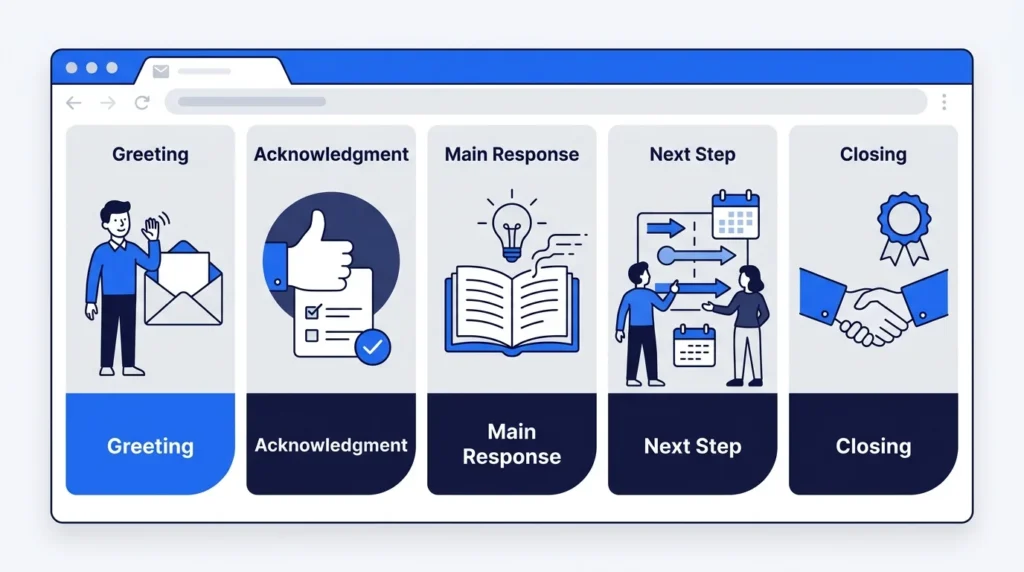
Use this simple format for most workplace emails.
- Greeting: Start with the person’s name.
- Acknowledgment: Thank them or confirm receipt.
- Main response: Answer their question or request.
- Next step: State what happens next, if needed.
- Closing: End with a polite sign-off.
General Professional Email Response Template
Subject: Re: [Original Subject]
Hi [Name],
Thank you for your email. [Answer the main question or address the request.]
[Add any details or next steps the recipient needs.]
Please let me know if you have any questions.
Best regards, [Your Name]
Example: If a coworker asks for a project update, you could write:
Hi Sarah,
Thank you for checking in. The project is on schedule, and I expect to finish the first draft by Thursday.
I’ll share the draft with you once it’s ready.
Best regards, Alex
This format works well because it gives the reader the answer, a deadline, and a clear next step.
2. Professional Email Response Examples for Common Situations
These examples cover everyday workplace messages. Choose the one that fits your situation and replace the details before sending it.
Example 1: Replying to a Professional Email
When to use it: When someone sends you a general work email that needs a response.
Hi [Name],
Thank you for reaching out. I appreciate the information you shared.
I’ll review the details and get back to you if I have any questions.
Best regards, [Your Name]
Why it works: It acknowledges the message and shows that you will take action.
Example 2: Acknowledging Receipt of an Email
When to use it: When you need to confirm that you received a message or document.
Hi [Name],
Thank you for your email. I confirm that I received your message and the attached documents.
I’ll review everything and follow up if I need any additional information.
Best, [Your Name]
Short version:
Thank you for your email. I’ve received the documents and will review them shortly.
Use this reply when you want to confirm receipt without giving a full answer yet.
Example 3: Responding to Your Boss
When to use it: When your manager gives you instructions, requests an update, or assigns a task.
Hi [Manager’s Name],
Thank you for the update. I understand the requirements and will complete the task by [Date].
I’ll let you know if I encounter any issues.
Best regards, [Your Name]
Why it works: It confirms the request and sets a clear deadline.
Example 4: Replying to a Coworker
When to use it: For everyday communication with teammates.
Hi [Name],
Thanks for sharing this with me. I’ll review the details and send you my feedback by [Date].
Let me know if there’s anything else you need.
Best, [Your Name]
This reply is friendly without sounding too casual.
Example 5: Responding to a Client Email
When to use it: When a client asks a question, shares information, or requests an update.
Dear [Client’s Name],
Thank you for contacting us. I’d be happy to help with your request.
[Provide the answer or explain the next step.]
Please let me know if you need any further information.
Kind regards, [Your Name] [Job Title]
For client emails, answer the main question as early as possible. Avoid vague promises or deadlines you cannot meet.
Example 6: Replying to a Thank-You Email
When to use it: When a coworker, manager, or client thanks you for your help.
Hi [Name],
You’re very welcome! I’m glad I could help.
Please feel free to reach out if you need anything else.
Best, [Your Name]
Short version:
You’re welcome! Happy to help.
Choose the shorter version for a simple, friendly exchange.
Example 7: Responding to a Compliment
When to use it: When someone praises your work or recognizes your effort.
Hi [Name],
Thank you for your kind words. I appreciate your feedback and am glad the work met your expectations.
Best regards, [Your Name]
Keep your response gracious and direct. You do not need to downplay your work or give a long explanation.
Example 8: Replying to a Meeting Invitation
When to use it: When someone invites you to a meeting and you can attend.
Hi [Name],
Thank you for the invitation. I confirm that I can attend the meeting on [Date] at [Time].
I look forward to discussing the project.
Best, [Your Name]
If you cannot attend, suggest another time instead of leaving the invitation unanswered.
Example 9: Confirming a Meeting Time
When to use it: When you need to confirm a date, time, or location.
Hi [Name],
Thank you for confirming the meeting. [Date] at [Time] works well for me.
I’ll be ready to discuss the agenda.
Best regards, [Your Name]
Include the time zone if participants work in different locations.
Example 10: Replying to a Request for Information
When to use it: When someone asks you for details, records, or project information.
Hi [Name],
Thank you for your email. Here’s the information you requested:
- Project name: [Project Name]
- Deadline: [Date]
- Current status: [Status]
Please let me know if you need any other details.
Best, [Your Name]
Use a short list when you need to answer several questions. It makes the reply easier to read.
3. Professional Email Responses for Requests and Follow-Ups
Some emails need more than a simple acknowledgment. The examples below help you request information, follow up, or explain a delay without sounding impatient.
Example 11: Asking for More Information
When to use it: When you cannot answer a request because some details are missing.
Hi [Name],
Thank you for your message. Could you please share [Specific Information]?
This will help me review your request and provide an accurate response.
Best regards, [Your Name]
Ask for the exact details you need rather than sending a vague request.
Example 12: Following Up on an Email
When to use it: When you have not received a reply and need an update.
Hi [Name],
I hope you’re doing well. I’m following up on my previous email about [Topic].
Could you please share an update when you have a chance?
Thank you, [Your Name]
For urgent matters, include the date by which you need a response. For routine matters, keep the tone friendly.
Example 13: Responding When You Need More Time
When to use it: When you need extra time to review a request or complete a task.
Hi [Name],
Thank you for your email. I’m reviewing the details and need a little more time to provide a complete answer.
I’ll get back to you by [Date].
Thank you for your patience.
Best regards, [Your Name]
Give a realistic deadline. If that deadline changes, send an update before it passes.
Example 14: Sending a Delayed Response
When to use it: When you need to apologize for taking longer than expected to reply.
Hi [Name],
Thank you for your patience, and I apologize for the delayed response.
[Answer the original question or provide the requested update.]
I appreciate your understanding.
Best, [Your Name]
A brief apology is usually enough. Focus on answering the original message.
Example 15: Replying to a Reminder Email
When to use it: When someone reminds you about a task, deadline, or meeting.
Hi [Name],
Thank you for the reminder. I’ve noted the deadline and will complete the task by [Date].
Best regards, [Your Name]
If you cannot meet the deadline, explain the issue and suggest a realistic alternative.
Example 16: Confirming That You Completed a Task
When to use it: When you need to tell a manager or teammate that work is finished.
Hi [Name],
The requested task is complete. I’ve attached the updated file for your review.
Please let me know if you need any changes.
Best, [Your Name]
Only state that a task is complete after you have checked the work.
Example 17: Responding to an Email With an Attachment
When to use it: When someone asks you to send a file or document.
Hi [Name],
Thank you for your email. I’ve attached the requested [Document Name].
Please let me know if you have any trouble opening the file.
Best regards, [Your Name]
Before sending, check that the correct file is attached and that it is ready to share.
4. Formal and Polite Email Response Examples
A formal reply is useful for senior managers, new clients, job applications, and people you do not know well. A polite reply can still sound natural and direct.
Example 18: Formal Business Email Response
When to use it: When writing to a senior professional, business partner, or formal contact.
Dear [Recipient’s Name],
Thank you for your email regarding [Topic].
I have reviewed the information and would like to confirm that [Your Response].
Please let me know if you require any additional details.
Sincerely, [Your Full Name] [Job Title]
Use the recipient’s preferred title if you know it. Otherwise, a simple professional greeting is often a good choice.
Example 19: Replying to a Job Interview Email
When to use it: When a recruiter or hiring manager contacts you about an interview.
Dear [Recruiter’s Name],
Thank you for the invitation to interview for the [Job Title] position. I appreciate the opportunity.
I am available on [Date] at [Time] and look forward to speaking with you.
Best regards, [Your Full Name]
If the suggested time does not work, offer one or two other options.
Example 20: Responding to a Job Offer
When to use it: When an employer sends you an offer and you want to accept it.
Dear [Hiring Manager’s Name],
Thank you for offering me the [Job Title] position at [Company Name]. I am pleased to accept the offer.
I look forward to joining the team on [Start Date]. Please let me know if there are any remaining steps I need to complete.
Sincerely, [Your Full Name]
Check the salary, benefits, job title, and start date before accepting an offer.
Example 21: Politely Declining a Request
When to use it: When you cannot take on a task, invitation, or additional responsibility.
Hi [Name],
Thank you for thinking of me. Unfortunately, I’m unable to take this on because of my current commitments.
I appreciate your understanding.
Best, [Your Name]
You can offer another option if one is available, but you do not need to give a long personal explanation.
Example 22: Requesting a Deadline Extension
When to use it: When you need more time to complete an assignment or project.
Hi [Name],
I’m writing to ask whether it would be possible to extend the deadline for [Task] from [Original Date] to [New Date].
I need additional time to complete the work and check the final details. I understand the importance of the deadline and appreciate your consideration.
Best regards, [Your Name]
Make the request early and explain how the new date will affect the work.
5. Professional Email Responses for Difficult Situations
Difficult emails call for calm, clear wording. Avoid replying in anger, blaming others, or making promises before you know what happened.
Example 23: Apologizing for a Mistake
When to use it: When you made an error that affected a coworker, customer, or project.
Hi [Name],
I apologize for the mistake in [Specific Issue]. I understand that it caused [Brief Impact].
I’ve taken steps to correct it and will keep you updated on the result.
Thank you for your patience.
Best regards, [Your Name]
A good apology names the issue and explains the action you are taking. Do not make excuses or claim the problem is fixed before checking.
Example 24: Responding to a Customer Complaint
When to use it: When a customer reports a problem with a product, service, or order.
Dear [Customer’s Name],
Thank you for bringing this issue to our attention. I’m sorry to hear about your experience.
We are reviewing the details and will update you by [Date] with the next steps.
Thank you for giving us the chance to address your concern.
Kind regards, [Your Name] [Company Name]
Avoid arguing with the customer. State what you can confirm and explain how the issue will be handled.
Example 25: Responding to Critical Feedback
When to use it: When a manager or coworker points out a problem with your work.
Hi [Name],
Thank you for sharing your feedback. I appreciate you pointing out these areas for improvement.
I’ll review your comments and make the needed changes. I’ll send you an updated version by [Date].
Best, [Your Name]
You can acknowledge useful feedback without agreeing with every point. If you need clarification, ask a specific question.
Example 26: Disagreeing Politely in an Email
When to use it: When you have a different view on a work decision or proposal.
Hi [Name],
Thank you for sharing your thoughts. I see your point, although I have a different view on [Topic].
Based on [Reason or Evidence], I suggest we consider [Alternative].
I’d be happy to discuss this further.
Best regards, [Your Name]
Focus on the issue rather than the person. Give a clear reason for your view and leave room for discussion.
Example 27: Responding to an Angry Email
When to use it: When someone sends a frustrated or harsh message.
Hi [Name],
Thank you for sharing your concerns. I understand that this issue has been frustrating.
I’d like to review the details so we can identify the next steps. Could we arrange a brief call or continue the discussion by email?
Best regards, [Your Name]
Keep your response calm and factual. If the message includes threats or serious misconduct, follow your organization’s reporting process instead of handling it alone.
Example 28: Correcting Incorrect Information
When to use it: When someone shares a wrong date, figure, or project detail.
Hi [Name],
Thank you for the update. I wanted to clarify one detail: [Correct Information].
The correct [Date, Figure, or Detail] is [Accurate Information]. Please let me know if you would like me to share the supporting details.
Best, [Your Name]
Correct the information without embarrassing the sender. Check your facts before sending the reply.
6. Short Professional Email Responses You Can Copy
Sometimes a full email is unnecessary. These short replies work well for simple questions, quick updates, and routine work messages.
| Situation | Professional response |
|---|---|
| Acknowledging a message | Thank you for the update. |
| Confirming receipt | I’ve received your email. |
| Agreeing to a request | That works for me. |
| Confirming a deadline | I’ll complete this by Friday. |
| Asking for clarification | Could you please clarify this point? |
| Sharing an update | Here’s the latest update on the project. |
| Requesting a reply | Please let me know your thoughts. |
| Sending a file | I’ve attached the requested document. |
| Accepting a meeting | I confirm that I’ll attend. |
| Declining an invitation | Thank you for the invitation, but I can’t attend. |
| Apologizing for a delay | I apologize for the delay in getting back to you. |
| Ending a conversation | Thank you for your time and help. |
Use these short responses when the message is simple and the next step is clear. Add more detail if the recipient needs an explanation or a decision.
7. Professional Email Greetings and Closings
The greeting and sign-off set the tone for your message. Choose words that fit your relationship with the recipient.
Professional Email Greetings
- Dear [Name]: Formal business communication.
- Hello [Name], Professional and friendly.
- Hi [Name], Everyday workplace messages.
- Good morning [Name], A polite greeting for an early-day message.
Professional Email Closings
- Best regards, A safe choice for most work emails.
- Kind regards, Polite and slightly warm.
- Sincerely, Formal letters and business messages.
- Best, Short and friendly.
- Thank you, Useful when asking for help or confirming an action.
- Regards, Direct and professional.
Avoid choosing a greeting or closing just because it sounds formal. A simple greeting that fits your workplace is usually enough.
8. How to Choose the Right Email Response
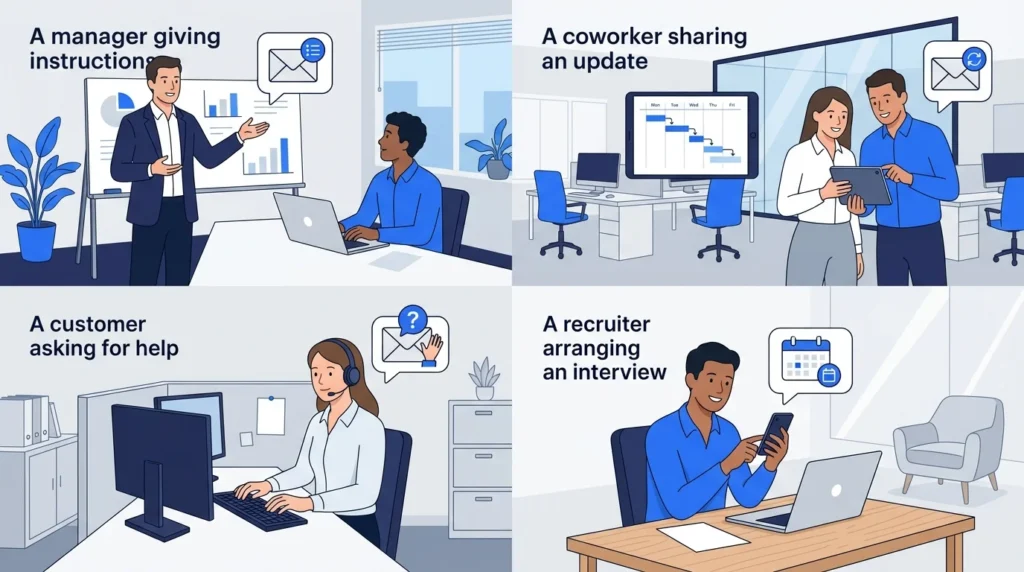
The best reply depends on what the sender needs from you. Use the table below to choose the right approach.
| Email situation | Best response style | What to include |
|---|---|---|
| General work question | Direct and polite | A clear answer |
| Request for a document | Helpful and specific | File or delivery date |
| Meeting invitation | Clear and brief | Acceptance or other times |
| Customer complaint | Calm and respectful | Next steps and timing |
| Delayed reply | Apologetic and direct | Answer and any needed update |
| Disagreement | Respectful and factual | Reason and alternative |
| Job offer | Formal and clear | Decision and start date |
| Missing information | Courteous and specific | Exact details needed |
If the message contains several questions, answer each one in order. This helps prevent missed details and reduces the need for extra emails.
9. Common Professional Email Response Mistakes
Small errors can make an email confusing or less helpful. Check for these problems before sending your reply.
- Ignoring the main question: Give the answer near the beginning.
- Writing too much: Remove details the reader does not need.
- Using a harsh tone: Choose calm and respectful words.
- Making vague promises: State a clear date or next step.
- Forgetting attachments: Check files before sending.
- Replying to only one question: Review the full message.
- Using the wrong recipient name: Check spelling and titles.
- Sending an emotional reply: Pause and review your wording.
- Using unclear subject lines: Keep the original subject when it still fits.
- Making unsupported claims: Share only information you can confirm.
How Quickly Should You Reply to a Professional Email?
Reply as soon as reasonably possible, based on the message’s urgency and your workplace expectations. A routine message may allow more time than a client issue or a time-sensitive request.
If you cannot provide a complete answer yet, send a short acknowledgment and give a realistic date for your full reply. This lets the sender know that you received the message and have a plan.
There is no single deadline that fits every email. Follow your workplace rules and any response times agreed with clients or coworkers.
10. Professional Email Response Checklist
Before sending an important email, use this quick checklist.
- I answered the main question.
- I used the correct recipient name.
- My tone is polite and clear.
- I included all needed details.
- I stated the next step, if needed.
- I checked dates and figures.
- I attached the correct files.
- I removed unnecessary wording.
- I checked spelling and grammar.
- I included a suitable closing.
A short review can help you catch missing details before the email reaches the recipient.
Frequently Asked Questions
1. What is a professional email response?
A professional email response is a clear, respectful reply to a work-related message. It answers the sender’s question, provides needed details, and explains the next step when necessary.
2. How do I start a professional email response?
Start with a suitable greeting, such as Hi [Name] or Dear [Name]. Then thank the sender or acknowledge the reason for their email before giving your answer.
3. How do I respond to an email politely?
Use respectful words, answer the main question, and avoid blame or harsh language. Keep your message direct and close with a suitable sign-off.
4. How do I reply when I don’t know the answer?
Confirm that you received the email and explain that you need time to check the details. Give a realistic date for your full response if you can.
5. How do I respond to a professional email from my boss?
Acknowledge the message, confirm any instructions, and state what you will do next. Include a deadline when one is relevant.
6. What is a good professional email closing?
Best regards, Kind regards, Sincerely, and Best are common choices. Select one that matches the level of formality in your workplace.
7. How do I follow up if someone does not reply?
Reply in the same email thread with a short, polite reminder. Mention the original topic and ask for an update. Include a deadline if the matter is time-sensitive.
8. Should professional email responses be short?
Most routine replies should be brief and focused. Add more detail when the topic is complex, several questions need answers, or the reader needs clear instructions.
Conclusion
These professional email response examples can help you handle everyday workplace messages with less stress. Whether you are replying to a manager, thanking a client, confirming a meeting, or dealing with a complaint, focus on three things: a clear answer, a respectful tone, and a useful next step.
Choose the template that fits your situation, replace the sample details, and check the message before sending it. A short, thoughtful reply can make workplace communication clearer and help prevent avoidable confusion.

Emily Carter (Content Writer & Communication Specialist) is a content writer and communication specialist at AllTypeInfo.com. She writes clear, practical, and easy-to-follow guides on email responses, message replies, writing templates, and everyday communication tips. Her goal is to help readers communicate with confidence in both personal and professional settings.


Pingback: How to Write Effective Responses to Emails and Messages