
You sent an email, waited for a reply, and heard nothing. Now you need to follow up without sounding impatient, rude, or too pushy. Choosing the right subject line can help the reader recognize your message and see what you need from them.
The best follow-up email subject lines after no response are short, polite, and clear. They remind the reader of your earlier message without placing blame. Whether you are contacting a client, recruiter, coworker, customer, or business prospect, this guide gives you ready-to-use subject lines for different situations.
Key Takeaways
- Keep subject lines short and easy to understand.
- Reply to the original email when the topic remains the same.
- Use specific words that describe your request.
- Wait a few business days before most follow-ups.
- Mention real deadlines when a response is time-sensitive.
- Avoid wording that sounds angry or demanding.
- Stop following up when the person declines or asks you to stop.
1. Best Follow-Up Email Subject Lines After No Response
These general subject lines work for many professional situations. Choose one that matches your relationship with the recipient and the purpose of your first email.
| Situation | Subject Line |
|---|---|
| General follow-up | Following Up on My Previous Email |
| Friendly reminder | Quick Check-In on [Topic] |
| Professional request | Follow-Up Regarding [Topic] |
| Previous conversation | Re: [Original Subject] |
| Waiting for feedback | Any Thoughts on [Topic]? |
| Waiting for an answer | Checking In on [Request] |
| Project discussion | Next Steps for [Project Name] |
| Waiting for approval | Approval Needed for [Project Name] |
| Sharing an update | Following Up on [Recent Update] |
| Closing a conversation | Closing the Loop on [Topic] |
Best general choice: Re: [Original Subject]
This works well when you are continuing the same conversation. It keeps the earlier message attached to the follow-up, so the recipient can review the details.
If you need to start a new email, use a clear subject such as Following Up on [Topic].
2. Polite Follow-Up Email Subject Lines
A polite subject line helps you ask for a response without making the recipient feel blamed. These options suit coworkers, managers, clients, and professional contacts.
Friendly and Casual
- Quick Check-In
- Just Checking In on [Topic]
- Following Up When You Have a Moment
- Any Updates on [Topic]?
- A Quick Question About [Topic]
- Checking In on My Last Email
- Touching Base About [Topic]
- Wanted to Follow Up on [Topic]
Formal and Professional
- Follow-Up Regarding [Subject]
- Request for an Update on [Topic]
- Follow-Up on Our Previous Discussion
- Status Update Request: [Project Name]
- Follow-Up on the Information Shared
- Request for Your Feedback on [Topic]
- Next Steps Regarding [Project Name]
- Follow-Up on Pending Approval
Quick tip: Use a friendly subject line for people you know well. Choose a more formal option for senior managers, new clients, or unfamiliar contacts.
3. Professional Follow-Up Subject Lines for Work
Work emails often involve decisions, approvals, reports, and project deadlines. Your subject line should make the purpose clear so the recipient knows what needs attention.
Here are useful examples for common workplace situations.
- Project update: Next Steps for [Project Name]
- Team feedback: Feedback Needed on [Document Name]
- Meeting request: Following Up on Our Meeting
- Manager approval: Approval Request: [Task or Project]
- Pending decision: Decision Needed on [Topic]
- Shared document: Review Request: [Document Name]
- Work assignment: Update on [Task Name]
- Pending information: Information Needed for [Project]
- Schedule confirmation: Confirming the Timeline for [Project]
- Team coordination: Quick Check-In on Team Priorities
Example: Following Up With a Manager
Suppose you emailed your manager about a project decision but received no reply.
A suitable subject line is:
Re: Approval Needed for the Website Update
This keeps the topic clear and makes it easy for your manager to find the earlier email.
If the decision affects a real deadline, mention the date in the subject line or message. Do not label the email urgent unless the situation calls for it.
4. Follow-Up Subject Lines for Clients and Customers
When a client does not reply, you may be waiting for feedback, payment, project approval, or a decision. Choose a subject line that names the task rather than simply asking for an update.
For a Client Who Has Not Replied
- Following Up on Your Project
- Quick Check-In: [Project Name]
- Next Steps for [Client Project]
- Feedback Needed on [Deliverable]
- Checking In on the Proposal
- Update Request: [Project Name]
- Questions About the [Project Name] Proposal
- Moving Forward With [Project Name]
For a Customer Service Email
- Follow-Up on Your Support Request
- Update Needed on Order [Order Number]
- Checking In on Your Recent Inquiry
- Follow-Up Regarding Your Service Request
- Status of Your Replacement Request
- Next Steps for Your Account Issue
For an Unanswered Invoice or Payment Email
- Payment Status: Invoice [Invoice Number]
- Reminder: Invoice [Invoice Number]
- Follow-Up on Outstanding Invoice
- Payment Update Request
- Invoice [Invoice Number]: Confirmation Needed
Use payment-related subject lines only when they match the actual situation. Check the invoice details and payment status before sending a reminder.
5. Follow-Up Email Subject Lines for Job Applications
Waiting for a response after applying for a job can be stressful. A good subject line helps the recruiter identify your application without making your email sound demanding.
After Submitting a Job Application
- Following Up on My [Job Title] Application
- Application Status: [Job Title]
- Checking In on the [Job Title] Position
- Follow-Up Regarding My Application
- [Your Name] | [Job Title] Application
- Update Request: [Job Title] Role
After a Job Interview With No Response
- Following Up on [Job Title] Interview
- Checking In on Next Steps
- Re: [Job Title] Interview
- Follow-Up on Interview Feedback
- Any Updates on the [Job Title] Role?
- Next Steps After Our Interview
After the Recruiter’s Promised Date Has Passed
- Follow-Up on the Hiring Timeline
- Checking In on the [Job Title] Process
- Update Request: Interview Next Steps
- Following Up on the Expected Decision Date
Example: If a recruiter said you would receive an update by Friday, wait until the stated date has passed and allow a little extra time if needed.
A suitable subject line is:
Following Up on [Job Title] Interview Next Steps
Keep the message brief. Thank the recruiter for their time, mention the role, and ask whether there is an update.
6. Follow-Up Subject Lines for Sales and Business Outreach
Sales emails often need a different approach from internal work messages. A useful subject line connects your follow-up to the prospect’s needs or your earlier discussion.
After Sending a Sales Email
- Quick Question About [Business Goal]
- Following Up on [Company Name]
- Re: [Original Subject]
- A Thought About [Business Challenge]
- Would [Solution] Help Your Team?
- Checking In About [Specific Need]
- One Idea for [Company Name]
- Is [Business Goal] Still a Priority?
After Sending a Proposal or Quote
- Following Up on the [Project Name] Proposal
- Questions About Your Proposal
- Next Steps on [Project Name]
- Checking In on the Quote
- Feedback on the [Service Name] Proposal
- Revisiting Our [Project Name] Discussion
- Proposal Review: [Project Name]
After a Networking Email
- Following Up on Our Conversation
- Great Connecting at [Event Name]
- Reconnecting About [Topic]
- Quick Question About [Shared Interest]
- Following Up on [Contact Name]’s Introduction
- Continuing Our Discussion About [Topic]
Avoid exaggerated claims or fake urgency. A subject line should reflect a real benefit, question, or next step.
7. Second Follow-Up Email Subject Lines After No Response
If your first follow-up receives no reply, you may send another message when the request still matters. Give the recipient enough time to respond before trying again.
These subject lines work for a second follow-up:
- Following Up Once More on [Topic]
- Re: [Original Subject]
- Checking In Again on [Project Name]
- Any Update on [Pending Request]?
- Next Steps for [Project Name]
- Is This Still a Priority?
- Revisiting My Previous Email
- Should I Keep This Open?
- Quick Update on [Topic]
- Closing the Loop on [Topic]
How to Choose a Second Follow-Up Subject
Use the subject line that fits your goal.
| Your Goal | Suggested Subject |
|---|---|
| Continue the same conversation | Re: [Original Subject] |
| Get a project decision | Next Steps for [Project Name] |
| Check whether plans changed | Is This Still a Priority? |
| Request a status update | Update Request: [Topic] |
| End your outreach politely | Closing the Loop on [Topic] |
A second follow-up should make the next step easier. You can ask whether the person wants to continue, needs more information, or prefers to pause the discussion.
If you have sent several messages without a reply, consider stopping. A lack of response does not always explain the reason, and repeated emails can damage a professional relationship.
8. Final Follow-Up Email Subject Lines
A final follow-up is useful when you want to close the conversation politely instead of continuing to send reminders.
Here are suitable options:
- Closing the Loop on [Topic]
- Final Check-In on [Project Name]
- Last Follow-Up on [Proposal]
- Should We Pause This Discussion?
- Checking In Before I Close This Out
- Final Update Request: [Topic]
- Is Now Still a Good Time?
- Closing Our Conversation About [Topic]
Use the word final only when you intend to stop following up after that message.
Example Final Follow-Up
Subject: Closing the Loop on [Project Name]
Hi [Name],
I wanted to check in one last time about [project or proposal]. If this is no longer a priority, no problem. Please let me know if you’d like to revisit it later.
Thanks for your time.
Best, [Your Name]
This approach gives the recipient room to decline or respond later without feeling pressured.
9. Gentle Reminder Email Subject Lines
Sometimes you need to remind someone about a task, form, document, meeting, or pending reply. A gentle reminder works best when the request is clear and the tone matches the situation.
Try these subject lines:
- Gentle Reminder: [Task or Topic]
- Friendly Reminder About [Topic]
- Reminder: [Document or Task]
- Quick Reminder on [Project Name]
- Follow-Up Reminder: [Request]
- Reminder: Feedback Needed by [Date]
- Checking In on [Pending Task]
- A Quick Reminder About Our Discussion
When Should You Use a Gentle Reminder?
Use one when:
- A task is still pending.
- A deadline is approaching.
- You need a small update.
- The recipient may have missed the first email.
- You want to keep the relationship friendly.
Avoid using gentle reminder for serious disputes or urgent problems that require direct language. State the issue and the required action instead.
10. How to Write a Follow-Up Email After No Response
A clear subject line helps, but the email itself also needs to make replying easy.
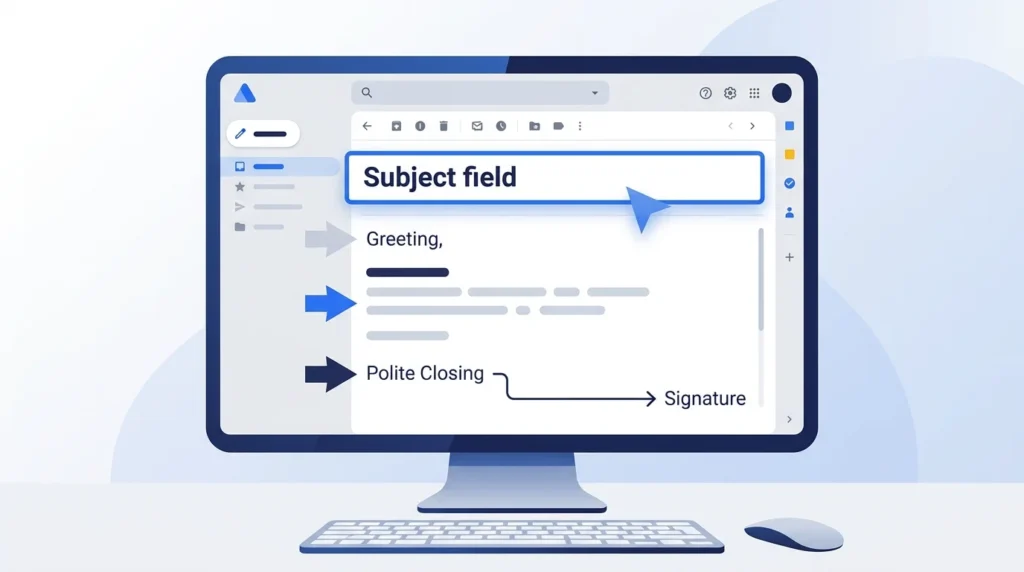
Use this simple structure:
- Greet the recipient. Use their name when you know it.
- Mention the earlier email. Identify the topic or date.
- State your request. Ask one clear question.
- Add a real deadline. Include one only when needed.
- Close politely. Thank them for their time.
Copy-and-Paste Follow-Up Email Template
Hi [Name],
I wanted to follow up on my email about [topic]. Have you had a chance to review it?
Please let me know if you need any additional information from me.
Thanks for your time.
Best,
[Your Name]
This template works for many everyday business emails. Add details that fit the situation instead of sending the same message to everyone.
Example With a Deadline
Hi [Name],
I’m following up on the [project or document] I sent on [date]. Could you please share your feedback by [deadline] so we can keep the project on schedule?
Please let me know if you need anything else.
Thank you,
[Your Name]
Use a deadline only if it is real and reasonable. If the deadline has changed, update the message before sending it.
11. How Long Should You Wait Before Following Up?
The right timing depends on the type of email, the recipient, and any deadline you agreed on.
| Situation | Practical Starting Point |
|---|---|
| Routine work email | 3–5 business days |
| Client proposal | 5–7 business days |
| Sales outreach | 3–5 business days |
| Job application | Follow the employer’s stated timeline |
| Interview update | After the promised date has passed |
| Urgent work request | Based on the actual deadline |
| Networking email | About 5–7 business days |
These are general guidelines, not strict rules. If someone gave you a specific date, use that date as your guide. For urgent issues, use the agreed process or a suitable faster channel.
Should You Reply in the Same Email Thread?
Usually, yes, if you are following up about the same topic.
Keeping the original thread helps the recipient see your earlier message and the details you already shared.
Start a new thread when:
- The original subject no longer fits.
- You have a different request.
- The audience has changed.
- The earlier thread is too long or confusing.
Do not add repeated subject prefixes manually. Your email service may add Re: automatically.
12. Subject Line Mistakes to Avoid
A poor subject line can make an ordinary reminder sound rude or misleading. Avoid these common mistakes.
- Too vague: Avoid
Update?when you can name the topic. - Too aggressive: Avoid
Why Haven't You Replied? - Fake urgency: Avoid
URGENT!!!for routine requests. - Too long: Remove words that do not help identify the request.
- Too personal: Avoid language that blames or embarrasses the reader.
- Too many reminders: Stop when further contact is no longer appropriate.
- Misleading wording: Do not promise news or an offer that is not included.
- Repeated generic messages: Add useful context when another follow-up is needed.
Before-and-After Examples
| Avoid | Better Alternative |
|---|---|
| Why Haven’t You Replied? | Checking In on [Topic] |
| URGENT RESPONSE NEEDED!!! | Response Needed by [Date] |
| Following Up Again Again | Re: [Original Subject] |
| Please Read Immediately | Review Request: [Document Name] |
| Any News???? | Update Request: [Project Name] |
| You Forgot to Reply | Gentle Reminder: [Topic] |
The better options focus on the request rather than the recipient’s lack of response.
13. Quick Checklist Before Sending
Review these points before sending your follow-up.
- Check the original email.
- Confirm the recipient’s name.
- Choose a specific subject line.
- Keep the message short.
- Ask one clear question.
- Include only real deadlines.
- Check attachments and dates.
- Use a polite closing.
- Avoid unnecessary follow-ups.
A short review can help you avoid sending the wrong message or repeating a request that has already been answered.
Frequently Asked Questions
1. What is the best subject line for a follow-up email after no response?
Re: [Original Subject] is a useful default when you are continuing the same conversation. For a new thread, use a specific subject such as Following Up on [Topic].
2. How do I politely follow up without sounding pushy?
Use a neutral subject line, mention your earlier email, and ask one clear question. Avoid blaming the recipient or demanding an immediate reply without a real reason.
3. Should I change the subject line for my second follow-up?
You do not need to change it if the original subject still fits. Keep the same thread for continuity, or use a new subject if your request or purpose has changed.
4. How many follow-up emails should I send?
There is no fixed number for every situation. One or two polite follow-ups are a reasonable starting point for many routine business requests. Stop sooner if the person declines or asks you not to contact them.
5. Is “Just checking in” a good email subject line?
It can work for a casual message, but it does not explain the topic. Checking In on [Project Name] gives the recipient more useful context.
6. What should I write in a follow-up email after no response from a recruiter?
Use a subject such as Following Up on [Job Title] Interview. Briefly mention your interview or application, express continued interest, and ask whether there is an update.
7. What is a good subject line for a final follow-up?
Closing the Loop on [Topic] is a polite option. It signals that you want to resolve the conversation without suggesting that the recipient has done something wrong.
8. Should I send a follow-up email if my first email was not opened?
You can send a brief follow-up after allowing enough time. Check the address and any delivery errors first. Email open tracking is imperfect, so an unopened status does not prove that the person never saw your message.
Conclusion
The best follow-up email subject lines after no response are clear, polite, and relevant to the original request. Use Re: [Original Subject] for an ongoing conversation, or choose a specific line such as Checking In on [Project Name] for a fresh email.
Match the subject to your goal, give the recipient enough time to respond, and keep the message brief. A respectful follow-up makes your request clear while leaving room for the other person to reply when they can.

Emily Carter (Content Writer & Communication Specialist) is a content writer and communication specialist at AllTypeInfo.com. She writes clear, practical, and easy-to-follow guides on email responses, message replies, writing templates, and everyday communication tips. Her goal is to help readers communicate with confidence in both personal and professional settings.