A cybersecurity incident can affect business operations, expose private information, and interrupt important services. After discovering a security problem, a company needs to record what happened, how its team responded, and what steps were taken to fix it. This is where an incident response report becomes useful.
An incident response report gives managers, IT teams, and security professionals a clear record of a security incident. It helps them review the problem, track response actions, find weaknesses, and reduce the risk of similar incidents.
In this guide, you will learn what an incident response report is, what information it should include, how to write one, and how to use a practical template. You will also see a sample report based on a realistic cybersecurity situation.
What Is an Incident Response Report?
An incident response report is a formal document that records what happened during a security incident and how an organization handled it.
It explains how the incident was discovered, which systems or accounts were affected, what actions the response team took, and how the problem was resolved.
Companies use these reports to keep accurate records of security events and improve their future response plans.
A report may cover different types of incidents, including:
- Phishing attacks: Fake emails or messages that try to steal private information.
- Malware infections: Harmful software that damages systems or steals data.
- Ransomware attacks: Attacks that lock files or systems and demand payment.
- Unauthorized access: Someone accessing an account, device, or network without permission.
- Data breaches: Private or sensitive information being accessed or exposed without authorization.
- Denial-of-service attacks: Attempts to make a website or online service unavailable.
- Insider incidents: Security problems caused by employees, contractors, or other trusted users.
An incident response report is useful for both small businesses and large organizations. It gives everyone involved a shared record of the event instead of relying on memory or scattered notes.
Example 1:
A company’s security team discovers that an employee account was accessed by an unknown person. The team disables the account, checks login records, and reviews whether company files were accessed. It then prepares an incident response report describing the event and the actions taken.
This example shows how a report records the incident from its discovery through the investigation and recovery process.
Why Is an Incident Response Report Important?
An incident response report helps an organization keep track of security problems and make better decisions after an incident.
Here are some of its main benefits.
1. Creates a Clear Record of the Incident
A report records important details such as the incident date, detection time, affected systems, people involved, and actions taken.
This information helps teams review the event without depending on personal memory.
2. Helps Find the Root Cause
The root cause is the main reason an incident happened.
For example, a hacker may have accessed an employee account because the account used a stolen password and did not have multi-factor authentication (MFA) enabled.
A report helps security teams identify such weaknesses and decide how to address them.
3. Improves Future Security
Incident reports help companies identify problems in their security systems and response plans.
For example, if employees repeatedly fall for phishing emails, the company may need better email protection and security training.
4. Supports Business Decisions
Managers need clear information before approving security changes or spending money on repairs.
A report explains the business impact, affected services, recovery costs, and actions that still need attention.
5. Supports Compliance and Internal Reviews
Some organizations have legal, regulatory, contractual, or internal reporting duties after certain security incidents.
A complete report can help them maintain records for reviews and show what actions were taken.
However, an incident response report does not automatically meet every legal reporting requirement. Companies should check the rules that apply to their industry and situation.
Example 2:
A small online store discovers that an attacker accessed its customer support system. The security team records the affected accounts, reviews the available logs, and documents the steps used to secure the system.
The report gives management a record of the incident and helps the company decide which security changes are needed.
What Should an Incident Response Report Include?
A useful cybersecurity incident report should contain enough information to explain what happened and how the organization responded.
The exact format can vary, but most reports include the following sections.
1. Incident Identification
Start with basic information that helps identify the incident.
Include:
- Incident ID or case number
- Report title
- Date the report was created
- Name or role of the report writer
- Department or response team
- Incident category
- Severity level
- Current incident status
An incident ID helps teams find the correct report in their records.
2. Executive Summary
The executive summary gives readers a short overview of the incident.
It should explain:
- What happened
- When the incident was detected
- Which systems or departments were affected
- What the team did to control the incident
- Whether the incident was resolved
- What major risks or actions remain
Write this section in simple language so managers can understand the situation without reading every technical detail.
3. Incident Description
Explain what happened in a clear and factual way.
Include the known incident type, how it was discovered, and what happened before the response team became involved.
Avoid guesses. If the cause is still unknown, state that the investigation is ongoing.
4. Incident Timeline
A timeline of events records important actions in the order they happened.
Include dates, times, time zones, and short descriptions.
For example:
| Date and Time (UTC) | Event |
|---|---|
| March 10, 2026, 09:15 | Unusual login detected |
| March 10, 2026, 09:25 | Security team notified |
| March 10, 2026, 09:40 | Account access disabled |
| March 10, 2026, 10:30 | Login records reviewed |
| March 10, 2026, 12:00 | No further suspicious access detected |
| March 11, 2026, 14:00 | Investigation completed |
Use the correct time zone for every entry. Do not mix local time and UTC without clearly identifying them.
5. Affected Systems and Data
List the systems, devices, accounts, applications, and information involved.
Depending on the incident, include:
- Server names or asset IDs
- Affected employee accounts
- Application names
- Network devices
- Website or database names
- Types of information involved
- Number of affected users, if known
Do not include unnecessary passwords, secret keys, or other sensitive information in the report.
6. Detection Method
Explain how the organization discovered the incident.
Common detection methods include:
- Security monitoring alerts
- Antivirus notifications
- Employee reports
- Customer complaints
- Suspicious login activity
- Firewall alerts
- Routine security checks
Also record who received the alert and when the response team was notified.
7. Response and Containment Actions
The containment process aims to stop an incident from spreading or causing more damage.
Describe the actions taken by the response team.
Examples include:
- Disabling compromised accounts
- Disconnecting affected devices from the network
- Blocking suspicious IP addresses
- Removing malicious files
- Restricting access to affected systems
- Preserving relevant logs and evidence
Record who performed each action and when it happened.
8. Evidence Collected
Evidence helps support the investigation and explain what happened.
Depending on the incident, evidence may include:
- System logs
- Login records
- Email headers
- Security alerts
- Screenshots
- Network activity records
- File activity reports
- Device information
Record where each item came from, when it was collected, who collected it, and where it is stored.
For evidence that may be used in a legal investigation, maintain a proper chain of custody. This is a record of who handled the evidence and when it changed hands.
9. Root Cause Analysis
This section explains why the incident happened, based on the available evidence.
Possible causes include:
- Weak passwords
- Unpatched software
- Misconfigured security settings
- Stolen login details
- Unsafe email attachments
- Excessive account permissions
- Missing security controls
If the investigation cannot confirm the cause, clearly mark it as unknown or still under review.
10. Recovery Actions

Explain how the organization returned affected systems to normal operation.
Recovery actions may include:
- Restoring files from clean backups
- Updating software
- Resetting compromised passwords
- Rebuilding affected devices
- Removing malicious software
- Testing restored systems
- Monitoring systems for further suspicious activity
Include the date and result of each major recovery action.
11. Impact Assessment
Describe how the incident affected the organization.
Consider:
- Service interruptions
- Data loss or exposure
- Affected customers or employees
- Financial costs
- Operational delays
- Damage to business operations
- Legal or contractual concerns
Use confirmed information wherever possible. Clearly separate known losses from estimated or possible impacts.
12. Lessons Learned and Recommendations
Explain what the organization learned from the incident.
List practical improvements, such as:
- Enabling multi-factor authentication
- Improving email security
- Updating outdated software
- Reviewing account permissions
- Increasing employee security training
- Improving backup systems
- Updating incident response procedures
Assign an owner and target date to each recommended action.
How to Write an Incident Response Report
Writing a good report requires accurate information and a clear order. Follow these steps to prepare a useful document.

Step 1: Collect the Incident Details
Gather information from the people and systems involved.
Review security alerts, system logs, employee reports, and investigation notes.
Record the incident ID, detection time, affected assets, and people responsible for the response.
Example 3:
A security monitoring tool detects several failed login attempts followed by an unusual successful login. The security analyst saves the alert details and checks the account’s recent login activity.
This gives the response team useful information to start the report.
Step 2: Create a Timeline
Write down the important events in chronological order.
Include the time the incident started, when it was detected, when the team responded, and when the issue was contained.
If the exact start time is unknown, identify it as an estimated time.
Step 3: Identify the Affected Systems
List every system, account, application, or device that may have been affected.
Separate confirmed affected assets from assets that were checked but showed no signs of compromise.
This makes the incident scope easier to review.
Step 4: Record All Response Actions
Document each action taken by the response team.
For every major action, include:
- What was done
- Who performed it
- When it happened
- Why it was needed
- What result it produced
Use clear language instead of vague statements such as “the problem was fixed.”
Step 5: Review the Evidence
Check the available evidence before writing conclusions.
Compare system logs, security alerts, and investigation notes. Keep original evidence safe and record any handling or transfer.
Do not describe an assumption as a confirmed fact.
Step 6: Identify the Root Cause
Explain the confirmed reason for the incident.
If the team has not found the cause, say so. You can update the report when new evidence becomes available.
Step 7: Explain the Impact and Recovery
Describe the effect on the business, users, and systems.
Then explain how the team restored services and what checks were completed before returning systems to normal operation.
Step 8: Add Recommendations
Suggest clear actions that can reduce future risks.
Each recommendation should have a responsible person or team and a target date.
Step 9: Review and Approve the Report
Check dates, times, names, technical details, and evidence records.
Ask the appropriate security manager or incident lead to review the report before marking it final.
Keep a record of report versions and later updates.
Incident Response Report Template
You can use the following incident response report template as a starting point for your organization’s security records.
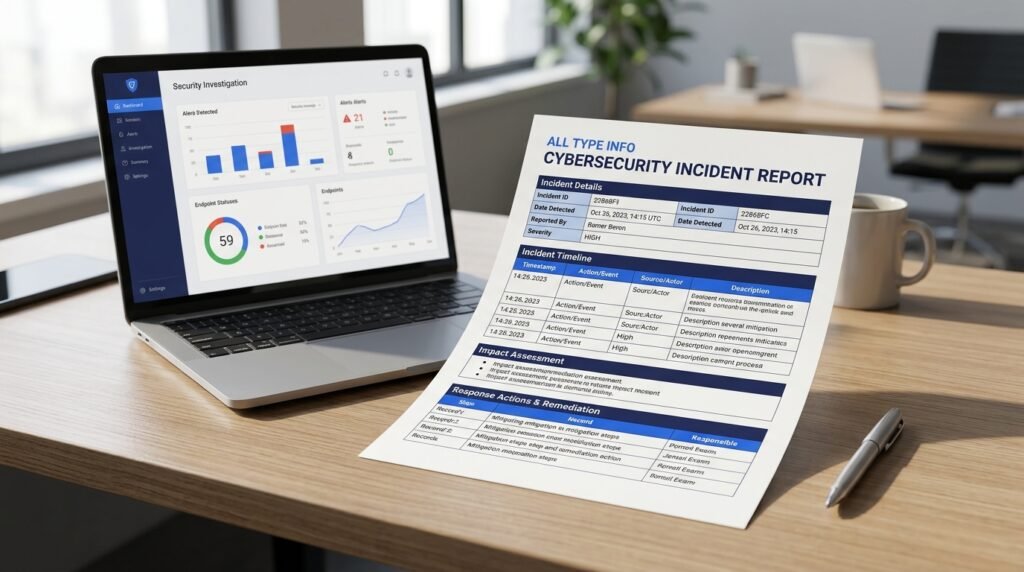
Basic Incident Information
| Field | Details |
|---|---|
| Incident ID | IR-2026-001 |
| Report Title | Security Incident Response Report |
| Report Date | [Enter date] |
| Prepared By | [Name or role] |
| Department | [Department name] |
| Incident Type | [Phishing, malware, unauthorized access, etc.] |
| Severity | [Low, Medium, High, Critical] |
| Status | [Open, Contained, Resolved, Closed] |
Incident Summary
Description of Incident:
[Explain what happened and how the incident was discovered.]
Date and Time Detected:
[Enter date, time, and time zone.]
Affected Systems:
[List affected systems, applications, accounts, or devices.]
Business Impact:
[Explain the confirmed effect on the organization.]
Incident Timeline
| Date and Time | Event | Person or Team Responsible |
|---|---|---|
| [Date/time] | [Incident detected] | [Name/team] |
| [Date/time] | [Response started] | [Name/team] |
| [Date/time] | [Containment completed] | [Name/team] |
| [Date/time] | [Recovery completed] | [Name/team] |
Investigation Details
Detection Method: [Describe how the incident was discovered.]
Root Cause: [Enter confirmed cause or state that it is unknown.]
Evidence Collected: [List logs, alerts, screenshots, and other evidence.]
Affected Data: [Describe the type of data involved, if any.]
Response Actions
| Action | Date and Time | Responsible Person | Result |
|---|---|---|---|
| [Action 1] | [Date/time] | [Name] | [Result] |
| [Action 2] | [Date/time] | [Name] | [Result] |
| [Action 3] | [Date/time] | [Name] | [Result] |
Recovery and Recommendations
Recovery Actions: [Describe how affected systems were restored.]
Security Improvements: [List recommended changes.]
Action Owner: [Name or department.]
Target Completion Date: [Enter date.]
Final Review
Prepared By: [Name]
Reviewed By: [Name or role]
Approval Date: [Date]
Final Incident Status: [Resolved or Closed, if appropriate]
This template can be adjusted to match the size of your organization, the type of incident, and its reporting needs. Keep sensitive technical evidence in approved, access-controlled storage rather than placing unnecessary details in a widely shared report.
Incident Response Report Example
Here is a fictional example showing how a company might document an unauthorized account access incident.
Incident Overview
| Field | Example Details |
|---|---|
| Incident ID | IR-2026-015 |
| Incident Type | Unauthorized Account Access |
| Date Detected | April 12, 2026 |
| Severity | High |
| Affected System | Employee Email Account |
| Current Status | Resolved |
| Response Team | IT Security Team |
Executive Summary
On April 12, 2026, the IT security team detected unusual login activity involving an employee email account. The login came from an unfamiliar location and was followed by suspicious account activity.
The team disabled the account, reset its password, and reviewed available login records. The investigation found that the account had been accessed without authorization.
The company restored secure account access, enabled additional security controls, and continued monitoring for suspicious activity. No confirmed evidence of further account access was found during the review.
Timeline of Events
| Time (UTC) | Event |
|---|---|
| 08:20 | Security system detected unusual login activity. |
| 08:30 | IT security team started the investigation. |
| 08:45 | Account access was temporarily disabled. |
| 09:15 | Password reset was completed. |
| 10:00 | Login records and account activity were reviewed. |
| 13:30 | Security checks were completed. |
| April 13 | Follow-up monitoring showed no further suspicious activity. |
Investigation Findings
The team found that the account had been accessed through login details that were not recognized by the employee.
The investigation reviewed:
- Recent login activity
- Account access records
- Email forwarding settings
- Available security alerts
- Changes to account permissions
The review did not confirm whether any company information had been accessed or copied. That point was recorded as unconfirmed rather than treated as a proven data loss.
Response Actions
The IT team disabled the affected account, reset its password, reviewed account settings, and checked for unauthorized changes.
It also required additional account security measures before restoring access.
Root Cause
The investigation found that the account’s previous password had been exposed. The company also found that multi-factor authentication had not been enabled for the account.
Lessons Learned
The company decided to:
- Require multi-factor authentication for all employee email accounts.
- Review account security settings.
- Improve alerts for unusual login activity.
- Provide employees with additional phishing awareness training.
- Review access permissions on a regular schedule.
Example 4:
The security manager reviews the completed report and assigns the IT department a deadline to enable multi-factor authentication across all employee accounts.
This shows how an incident response report can lead to specific security improvements after an incident has been resolved.
Common Mistakes to Avoid in an Incident Response Report
Even a detailed report can be less useful if important information is missing or unclear.
Avoid these common mistakes.
1. Leaving Out Important Dates and Times
Missing timestamps make it harder to reconstruct what happened.
Record the time of detection, response actions, containment, and recovery. Include the time zone.
2. Making Assumptions
Do not state that a person caused an incident unless the investigation supports that conclusion.
Separate confirmed findings from possible causes.
3. Writing Too Much Technical Detail in the Summary
Managers need a clear overview. Keep complex technical evidence in the investigation section or an appendix.
4. Forgetting to Record Evidence
Save relevant logs, alerts, and investigation records. Record where the evidence is stored and who handled it.
5. Ignoring Business Impact
A report should explain how the incident affected services, employees, customers, or business operations.
6. Providing Recommendations Without Owners
A recommendation is more useful when someone is responsible for completing it.
Add a target date and track its progress.
7. Closing the Report Too Early
Do not mark an incident as fully resolved while important investigation or recovery work remains incomplete.
Clearly identify any open issues and follow-up actions.
Best Practices for Incident Response Documentation
Use these practices to keep reports clear, accurate, and useful.
- Write facts as they become available: Record important events during the response instead of waiting until everything is over.
- Use a standard template: Keep the same basic report format across the organization.
- Protect sensitive information: Restrict report access to authorized people.
- Use consistent timestamps: Record the time zone for every important event.
- Keep evidence organized: Store logs, screenshots, and other records securely.
- Track outstanding actions: Assign owners and deadlines to recommendations.
- Review reports regularly: Look for repeated problems and gaps in security procedures.
- Update reports when needed: Record new findings and keep a clear version history.
- Use clear language: Make the report useful to both technical teams and business managers.
A good report should make it easy to answer five basic questions: What happened? When did it happen? What was affected? What did the team do? What needs to happen next?
Frequently Asked Questions
What is the main purpose of an incident response report?
The main purpose is to document a security incident and the actions taken to manage it. It helps an organization review what happened, identify weaknesses, and plan improvements.
Who prepares an incident response report?
An incident response team, IT security analyst, security manager, or assigned incident lead may prepare the report. The responsible person depends on the organization’s reporting process.
What are the five main steps in incident response?
A common incident response process includes preparation, detection and analysis, containment, eradication and recovery, and post-incident activity. Organizations may organize these activities differently based on their security plan.
What is the difference between an incident report and an incident response report?
An incident report may record many types of events, including workplace accidents, service problems, or security issues. An incident response report focuses on how a security incident was investigated, contained, resolved, and reviewed.
How long should an incident response report be?
There is no fixed length. A simple incident may need only a few pages, while a serious security breach may require a longer report with timelines, evidence records, technical findings, and supporting documents.
What is an incident response report template?
An incident response report template is a pre-made document with sections for incident details, timelines, affected systems, response actions, evidence, recovery, and recommendations. It helps teams record information in a consistent format.
When should an incident response report be completed?
Teams should record important details throughout the response. The final report is generally completed after the main investigation and recovery work, with updates added if new findings appear.
Should an incident response report include screenshots?
Yes, when screenshots help explain an event or support a finding. They should be relevant, dated where possible, stored securely, and checked for sensitive information before sharing.
Conclusion
An incident response report gives an organization a clear record of a cybersecurity incident, from the first warning to the final recovery steps. It helps security teams explain what happened, identify affected systems, record evidence, and review their response.
A useful report should include an incident summary, timeline, investigation findings, containment actions, recovery details, and recommendations. Using a standard template can also make reports easier to prepare and review.
If your organization handles sensitive data or relies on online systems, start with a simple incident response report template and update it as your security needs change. Make sure every important action has a clear record, a responsible person, and a follow-up plan.

Emily Carter (Content Writer & Communication Specialist) is a content writer and communication specialist at AllTypeInfo.com. She writes clear, practical, and easy-to-follow guides on email responses, message replies, writing templates, and everyday communication tips. Her goal is to help readers communicate with confidence in both personal and professional settings.