A cyberattack can affect a business without warning. A ransomware attack may lock important files, a phishing email may expose employee accounts, or a security breach may put customer information at risk.
Without a clear response plan, employees may waste time trying to decide what to do. Important evidence may also get lost, and the attack may spread to other systems.
A cyber incident response plan template gives your organization a clear process for handling these situations. It explains who should respond, what actions to take, how to report the incident, and how to restore normal operations.
In this guide, you will find a practical template, step-by-step response instructions, team responsibilities, incident checklists, and realistic examples. You can copy the template and edit it to match your business.
What Is a Cyber Incident Response Plan Template?
A cyber incident response plan template is a ready-made document that helps an organization prepare for, manage, and recover from cybersecurity incidents.
It provides written instructions for responding to threats such as:
- Ransomware attacks
- Phishing emails
- Data breaches
- Malware infections
- Unauthorized account access
- Website attacks
- Denial-of-service attacks
- Lost or stolen business devices
The template identifies the people responsible for handling an incident and explains the actions they should take.
It also helps employees report suspicious activity and gives management a clear process for making important decisions.
Example 1:
An employee receives a suspicious email that asks them to open an attachment. After opening it, the computer begins showing unusual messages. The employee reports the issue to the IT team using the company’s cyber incident response plan.
This example shows how a written reporting process helps employees take action instead of ignoring a possible security threat.
Who Needs a Cyber Incident Response Plan?
A cyber incident response plan can help almost any organization that uses computers, networks, websites, or digital information.
Common users include:
- Small businesses: To protect customer information, payment records, and business files.
- Large companies: To coordinate security teams across different departments.
- Healthcare organizations: To protect patient information and critical systems.
- Schools and universities: To respond to attacks affecting student and staff records.
- Government offices: To protect public information and essential services.
- Online stores: To respond to payment system attacks and customer data exposure.
- IT service providers: To manage incidents affecting their own systems and client networks.
Even a small business with only a few employees can benefit from a simple response plan.
Why Does Your Business Need a Cyber Incident Response Plan?
A cybersecurity incident can interrupt daily work, affect customers, and create financial losses.
A response plan helps your organization take organized action during a stressful situation.
Here are the main reasons to prepare one.
1. Reduce Damage From Cyberattacks
A quick response can help limit the spread of an attack.
For example, isolating an affected computer from the company network may stop a threat from reaching other connected devices. The action should be handled by trained staff using approved procedures.
2. Give Employees Clear Responsibilities
Employees need to know who should receive incident reports and who has permission to make important decisions.
A written plan removes confusion by assigning specific duties.
3. Protect Business and Customer Data
A response plan can include steps for identifying affected information, securing accounts, preserving evidence, and contacting the right people.
This is especially important when an incident may expose personal or financial information.
4. Support Business Continuity
Some cyberattacks can stop employees from accessing email, websites, databases, or other important services.
A response plan should explain how the business will continue essential work while technical teams address the incident.
5. Improve Recovery
Recovery involves restoring affected systems and checking that they are safe to use.
A written process helps teams avoid bringing compromised systems back online too early.
Example 2:
A small online store discovers that attackers have accessed its customer database. The owner activates the response plan, contacts the IT provider, preserves relevant records, and asks legal counsel to review possible reporting duties.
This example shows how a response plan connects technical actions with business and legal decisions.
What Should a Cyber Incident Response Plan Include?
A useful cybersecurity incident response plan should cover the full incident lifecycle.
The following sections provide a practical structure.
1. Plan Information
Start by identifying the organization and the people responsible for maintaining the plan.
Include:
- Organization name
- Business address
- Plan owner
- Document version
- Date created
- Last review date
- Next review date
- Approval authority
- Emergency contact information
Keep this information current so employees can identify the correct document during an incident.
2. Purpose and Scope
Explain why the plan exists and which parts of the organization it covers.
Your scope may include:
- Office computers and laptops
- Company servers
- Cloud services
- Business email accounts
- Internal networks
- Websites and online stores
- Customer databases
- Employee devices used for work
- Third-party service providers
3. Incident Response Team
List the people who will manage cybersecurity incidents.
Include their names, job titles, phone numbers, email addresses, and backup contacts.
4. Incident Reporting Process
Explain how employees should report suspicious activity.
Provide a dedicated email address, phone number, or other reporting method. Include an alternative contact method in case normal communication systems are unavailable.
5. Incident Classification
Create categories to help your team decide how serious an incident may be.
For example:
| Severity | Description | Example |
|---|---|---|
| Critical | Major business disruption or serious data exposure | Widespread ransomware attack |
| High | Serious threat affecting important systems | Compromised administrator account |
| Medium | Limited security issue requiring investigation | Malware on one workstation |
| Low | Suspicious activity with limited impact | Blocked phishing email |
Your organization should define its own classification rules and escalation times.
6. Incident Response Procedures
Document the actions required to identify, contain, remove, and recover from a threat.
7. Communication Plan
Identify how the response team will communicate with employees, customers, business partners, and other parties when needed.
8. Evidence Collection
Explain how staff should preserve relevant records without changing or destroying important evidence.
9. Recovery Procedures
Describe how affected systems will be checked and restored.
10. Testing and Review
Set a schedule for testing the plan and updating it after exercises or real incidents.
Cyber Incident Response Plan Template (Copy and Edit)
The following is a practical cyber incident response plan template for businesses and organizations in the United States.
Copy the sections into a Word document or your preferred document editor. Replace the sample fields with your organization’s information.
Editable template
CYBER INCIDENT RESPONSE PLAN
Organization: [Enter organization name]
Document Version: [Enter version]
Last Updated: [Enter date]
SECTION 1: ORGANIZATION INFORMATION
| Field | Information |
|---|---|
| Organization Name | [Enter name] |
| Business Address | [Enter address] |
| Plan Owner | [Enter name] |
| IT Manager | [Enter name] |
| Executive Contact | [Enter name] |
| Emergency Phone | [Enter number] |
| Backup Contact | [Enter number] |
SECTION 2: PURPOSE
This plan explains how [Organization Name] will prepare for, identify, report, contain, investigate, and recover from cybersecurity incidents.
SECTION 3: SCOPE
This plan applies to company computers, networks, servers, cloud services, business applications, employee accounts, and business data.
SECTION 4: INCIDENT RESPONSE TEAM
| Role | Assigned Person | Backup Person |
|---|---|---|
| Incident Commander | [Name] | [Name] |
| IT/Security Lead | [Name] | [Name] |
| Network Administrator | [Name] | [Name] |
| Communications Lead | [Name] | [Name] |
| Legal Contact | [Name] | [Name] |
| Executive Contact | [Name] | [Name] |
SECTION 5: INCIDENT REPORTING
Employees must report suspected cybersecurity incidents through:
- Reporting email: [Enter email]
- Emergency phone: [Enter number]
- Alternative contact: [Enter method]
SECTION 6: INCIDENT RESPONSE PROCESS
- Identify and report the incident.
- Assess the threat and its severity.
- Activate the response team.
- Contain the affected systems.
- Preserve relevant evidence.
- Remove the threat.
- Restore affected systems.
- Monitor systems for further activity.
- Complete an incident review.
SECTION 7: COMMUNICATION
The communications lead will coordinate approved internal and external messages.
SECTION 8: EVIDENCE MANAGEMENT
Record the evidence source, collection date, time, responsible person, and storage location. Restrict access to authorized personnel.
SECTION 9: RECOVERY
Systems must be checked, secured, and approved for restoration before returning to normal business use.
SECTION 10: REVIEW AND APPROVAL
- Plan Owner: [Name]
- Approval Authority: [Name]
- Approval Date: [Date]
- Next Review Date: [Date]Replace all bracketed fields before approving and using this plan. Have qualified security and legal professionals review it.
Step-by-Step Cyber Incident Response Process
A response plan should explain what the team must do from the moment someone reports a possible attack until the organization completes its recovery.

A commonly used approach follows six main stages: preparation, identification, containment, eradication, recovery, and lessons learned.
Step 1: Preparation
Preparation takes place before an attack happens.
Your organization should prepare its staff, systems, tools, and communication methods.
Key actions include:
- Create and approve an incident response plan.
- Assign response team members.
- Maintain an updated contact list.
- Keep secure backups of important data.
- Install security updates.
- Train employees to report suspicious activity.
- Prepare incident reporting forms.
- Identify critical business systems.
- Test emergency communication methods.
Example 3:
A company schedules a cybersecurity exercise in which employees receive a simulated ransomware warning. The IT team practices its response steps, while management checks the emergency contact list.
This exercise helps the company find gaps before a real incident occurs.
Step 2: Identification
Identification means finding out whether suspicious activity is a real security incident.
Your team should collect information and assess what happened.
Possible warning signs include:
- Unexpected password reset messages.
- Unknown login attempts.
- Unusual network traffic.
- Files that suddenly become inaccessible.
- Unexpected software installations.
- Security alerts from antivirus tools.
- Unusual account activity.
- Reports of suspicious emails.
The team should record when the incident started, which systems are affected, and what information may be at risk.
Do not assume every security alert is a confirmed attack. Investigate it before assigning a final classification.
Example 4:
An employee reports that their business email account sent messages they did not write. The security team checks login records and finds an unfamiliar sign-in location.
The unusual activity gives the team a reason to investigate a possible account compromise.
Step 3: Containment
Containment means limiting the damage and preventing the incident from spreading.
The correct action depends on the threat and the affected system.
Possible actions include:
- Isolate affected devices from the network.
- Disable compromised accounts when appropriate.
- Block confirmed malicious access.
- Restrict access to affected services.
- Protect unaffected systems.
- Preserve important logs and records.
- Follow the organization’s emergency procedures.
Avoid shutting down or wiping affected devices without guidance from the response team. Doing so may destroy useful evidence or make investigation harder.
Example 5:
A business discovers malware on one office computer. Its IT team isolates the device from the company network and checks whether other computers show similar signs.
This action helps limit possible spread while the team investigates the incident.
Step 4: Eradication
Eradication means removing the cause of the incident from affected systems.
Your team should identify how attackers gained access and what changes are needed to remove their access.
Possible actions include:
- Remove confirmed malware.
- Close exploited security weaknesses.
- Reset affected passwords.
- Revoke compromised access tokens.
- Remove unauthorized accounts.
- Update vulnerable software.
- Review system configurations.
- Check for signs of continued unauthorized access.
For serious incidents, qualified cybersecurity professionals may need to investigate affected systems.
Example 6:
A company finds that an attacker accessed an employee account through a stolen password. The security team secures the account, revokes active sessions, resets credentials, and reviews the access records.
The team addresses the original access problem instead of simply changing the visible password.
Step 5: Recovery
Recovery means returning affected systems and services to safe operation.
Do not restore systems until the response team has addressed the threat and approved the recovery process.
Recovery actions may include:
- Restore clean data from verified backups.
- Reinstall or repair affected systems.
- Apply required security updates.
- Test important applications.
- Confirm user access is secure.
- Monitor systems for suspicious activity.
- Get approval before resuming normal operations.
Example 7:
A ransomware attack makes several business files unavailable. After removing the threat and checking the backup copies, the IT team restores the files and tests access before employees resume work.
This shows why backup testing is an important part of incident recovery.
Step 6: Lessons Learned
The final stage focuses on reviewing the incident and improving the response plan.
Your team should discuss:
- What happened?
- When was the incident discovered?
- How did the attacker gain access?
- Which systems were affected?
- How quickly did the team respond?
- Which actions worked well?
- What caused delays?
- What changes are needed?
Prepare a written post-incident report with findings and assigned improvement tasks.
Example 8:
After a phishing incident, a company discovers that several employees did not know how to report suspicious emails. Management adds a short reporting guide to employee training.
The review turns an incident into a chance to improve staff awareness and response procedures.
Cyber Incident Response Team Roles and Responsibilities
Every person involved in incident response should know their duties before an attack occurs.
A small business may assign several roles to one employee. Larger organizations may have separate teams for security, legal matters, communications, and recovery.
Here are the main roles to include.
1. Incident Commander
The Incident Commander coordinates the response team and oversees major decisions.
Responsibilities include:
- Activate the incident response plan.
- Assign tasks to team members.
- Coordinate response activities.
- Approve escalation decisions.
- Keep management informed.
- Confirm when the response can be closed.
2. IT or Security Lead
The IT/Security Lead manages the technical response.
Responsibilities include:
- Investigate security alerts.
- Identify affected systems.
- Coordinate containment.
- Remove threats.
- Review security records.
- Support system recovery.
3. Network Administrator
The network administrator checks the company’s network and connected devices.
Responsibilities include:
- Review network activity.
- Identify suspicious connections.
- Isolate affected network devices.
- Check firewall settings.
- Support network restoration.
4. Communications Lead
The communications lead manages approved messages during the incident.
Responsibilities include:
- Prepare internal announcements.
- Coordinate customer messages.
- Answer approved information requests.
- Work with management and legal advisers.
- Avoid sharing unverified information.
5. Legal Adviser
The legal adviser helps the organization review legal duties and possible reporting requirements.
Responsibilities include:
- Review possible data exposure.
- Advise on legal notification duties.
- Support communication decisions.
- Coordinate with outside legal professionals when needed.
- Help protect investigation records.
6. Executive Management
Senior management provides business decisions and approves resources.
Responsibilities include:
- Approve major response actions.
- Support business continuity.
- Assign emergency resources.
- Review business risks.
- Approve major recovery decisions.
Incident Response Team Contact List Template
Keep this list available in a secure location that remains accessible if company email or cloud storage becomes unavailable.
| Role | Name | Phone | Backup Contact | |
|---|---|---|---|---|
| Incident Commander | [Name] | [Phone] | [Email] | [Name] |
| IT/Security Lead | [Name] | [Phone] | [Email] | [Name] |
| Network Admin | [Name] | [Phone] | [Email] | [Name] |
| Communications | [Name] | [Phone] | [Email] | [Name] |
| Legal Adviser | [Name] | [Phone] | [Email] | [Name] |
| Executive | [Name] | [Phone] | [Email] | [Name] |
Include external contacts for your IT provider, cybersecurity insurance company, incident response vendor, and other relevant service providers.
Cyber Incident Response Checklist
A cyber incident response checklist gives employees and response teams a quick list of actions to follow during an emergency.
Use the following checklist as a starting point.
Before an Incident
- Create and approve the response plan.
- Assign team members and backups.
- Maintain emergency contact details.
- Identify critical business systems.
- Keep secure backups.
- Update operating systems and software.
- Train employees to report suspicious activity.
- Prepare alternative communication methods.
- Test the incident response process.
- Review the plan regularly.
During an Incident
- Record the date and time of discovery.
- Report the incident to the response team.
- Assess the possible impact.
- Assign an incident severity level.
- Activate the response plan if required.
- Identify affected systems and accounts.
- Contain the threat.
- Preserve relevant evidence.
- Inform approved stakeholders.
- Record every major action.
After an Incident
- Confirm the threat has been addressed.
- Restore systems from verified sources.
- Test affected services.
- Monitor for suspicious activity.
- Complete the incident report.
- Review the response process.
- Assign improvement tasks.
- Update the response plan.
- Provide additional employee training if needed.
Cyber Incident Report Template
A written incident report helps your organization keep a record of what happened and how the team responded.
It can also help during internal reviews, insurance discussions, and legal assessments.
Use this format to record important information.
Incident Details
| Field | Information |
|---|---|
| Incident ID | [Enter ID] |
| Incident Name | [Enter name] |
| Date Discovered | [Enter date] |
| Time Discovered | [Enter time and time zone] |
| Reported By | [Enter name] |
| Incident Type | [Enter type] |
| Severity Level | [Low/Medium/High/Critical] |
| Incident Commander | [Enter name] |
| Current Status | [Open/Investigating/Contained/Closed] |
Incident Description
Explain what happened, how the issue was discovered, and which systems may be affected.
Sample entry:
An employee reported unusual activity in their business email account. The security team began reviewing account activity and checking for unauthorized access.
Systems Affected
List the affected computers, servers, accounts, applications, and other business resources.
Actions Taken
| Date and Time | Action | Responsible Person | Result |
|---|---|---|---|
| [Date/time] | [Action taken] | [Name] | [Result] |
| [Date/time] | [Action taken] | [Name] | [Result] |
| [Date/time] | [Action taken] | [Name] | [Result] |
Evidence Collected
Record the evidence collected during the investigation.
Examples include:
- Security logs
- Email records
- Network activity records
- System alerts
- Screenshots
- Relevant device information
- Investigation notes
Include who collected each item, when it was collected, and where it is stored. Keep a record of every transfer or person who handles the evidence.
Final Report
- Confirmed cause: [Enter details]
- Affected information: [Enter details]
- Recovery actions: [Enter details]
- Business impact: [Enter details]
- Lessons learned: [Enter details]
- Follow-up tasks: [Enter details]
- Report approved by: [Enter name]
Example 9:
A company discovers that an employee account was accessed without permission. The security team records the discovery time, reviews login records, secures the account, and documents each action in the incident report.
This record gives management a clear timeline of the investigation and response.
Cyber Incident Response Playbooks for Common Attacks
A cyber incident response playbook provides specific instructions for handling a particular type of attack.
Your main response plan explains the overall process. Playbooks give the team more detailed instructions for common situations.
Start with the threats most likely to affect your organization.
1. Ransomware Response Playbook
Ransomware is malicious software that can block access to files or systems, often by encrypting data.
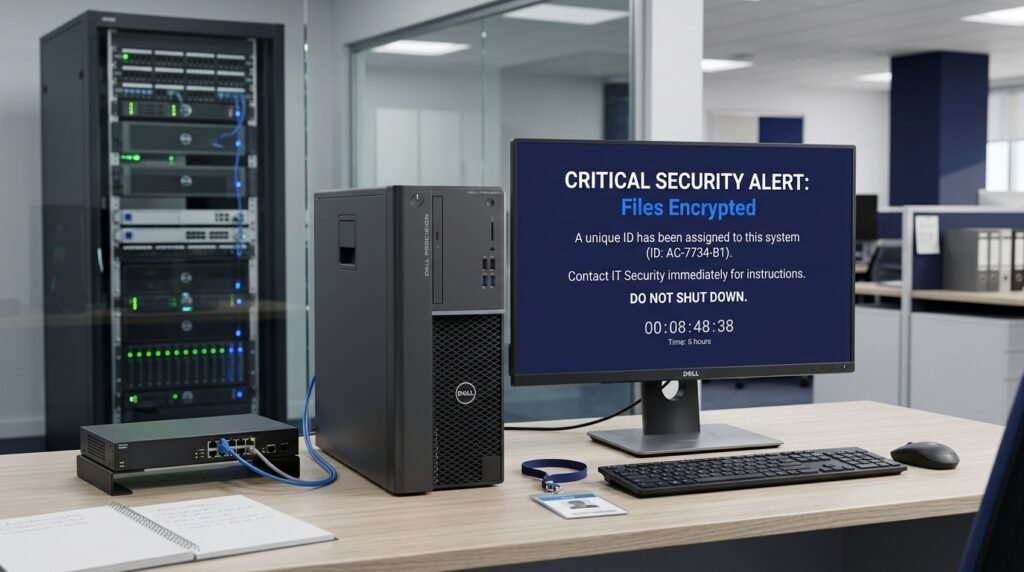
Recommended response actions:
- Report the incident immediately.
- Isolate affected devices from the network.
- Protect unaffected systems.
- Preserve relevant evidence.
- Contact the incident response team.
- Investigate how the attack started.
- Follow approved recovery procedures.
- Check backups before restoring files.
- Monitor systems after recovery.
Do not rush to pay a ransom. Involve legal advisers, security professionals, and relevant authorities before making decisions.
Example 10:
Employees discover that several shared business files have become inaccessible and display a ransom message. The IT team isolates affected systems and activates the company’s ransomware response playbook.
The priority is to limit further damage, protect other systems, and investigate the incident.
2. Phishing Response Playbook
Phishing is an attempt to trick people into sharing sensitive information or opening harmful links and attachments.
Recommended response actions:
- Ask employees to report the suspicious email.
- Identify other recipients.
- Check whether anyone opened the link or attachment.
- Secure accounts if credentials may have been exposed.
- Remove or block the malicious message where appropriate.
- Review relevant email and account records.
- Inform affected employees.
- Provide follow-up security training.
Example 11:
An employee receives an email that looks like a message from the company’s bank. The employee reports it instead of entering their login details.
This example shows why employees should check suspicious messages before taking action.
3. Data Breach Response Playbook
A data breach occurs when information is accessed, disclosed, or acquired without authorization.

Recommended response actions:
- Identify the information involved.
- Determine which systems or accounts are affected.
- Limit unauthorized access.
- Preserve relevant evidence.
- Engage legal and privacy advisers.
- Review applicable notification requirements.
- Prepare approved communications.
- Document the investigation.
- Take steps to prevent another breach.
Example 12:
An online store discovers that an unauthorized person may have accessed customer account records. The response team investigates the affected database and asks legal counsel to review possible customer notification duties.
The company should confirm the facts before making public statements about the incident.
4. Malware Response Playbook
Malware is software created to harm devices, steal information, or gain unauthorized access.
Recommended response actions:
- Investigate the security alert.
- Identify affected devices.
- Isolate confirmed infected systems.
- Preserve relevant records.
- Remove the malicious software using approved methods.
- Update vulnerable software.
- Scan other connected systems.
- Monitor for repeated activity.
5. Denial-of-Service Attack Playbook
A denial-of-service (DoS) attack attempts to make a website, application, or network service unavailable.
A distributed denial-of-service attack, or DDoS attack, uses multiple sources to send large amounts of traffic to a target.
Recommended response actions:
- Confirm the service interruption.
- Contact the hosting or network provider.
- Review traffic and security records.
- Activate approved traffic filtering or mitigation services.
- Keep business teams informed.
- Monitor service performance.
- Document the incident and recovery.
Cybersecurity Incident Response Plan for Small Businesses
Small businesses may not have a full-time cybersecurity department. However, they still need a clear process for handling security incidents.
A simple plan can assign responsibilities to existing employees and trusted service providers.
Recommended Small Business Setup
| Responsibility | Assigned Person |
|---|---|
| Incident coordination | Business owner |
| Technical response | IT provider |
| Employee reporting | Office manager |
| Customer communication | Business owner or manager |
| Legal advice | Outside legal adviser |
| Recovery support | IT provider |
One person can handle more than one responsibility, but the organization should identify backup contacts.
Five Steps for Small Businesses
- Create a written plan: Document emergency contacts, reporting methods, and response procedures.
- Secure business accounts: Use strong passwords and multifactor authentication.
- Protect important files: Maintain secure backups and test recovery.
- Train employees: Teach staff how to report suspicious activity.
- Review the plan: Update contacts and procedures after major changes.
Example 13:
A small accounting firm discovers that an employee’s email account has been compromised. The owner contacts the IT provider, secures the account, and checks whether client information may have been exposed.
A simple written process helps a small company respond without needing a large security department.
Cyber Incident Response Plan vs. Incident Response Policy
These two documents are related, but they serve different purposes.
| Feature | Incident Response Policy | Incident Response Plan |
|---|---|---|
| Main purpose | Sets rules and expectations | Explains how to respond |
| Focus | Management and security requirements | Practical response actions |
| Content | Authority, responsibilities, and principles | Procedures, contacts, and checklists |
| Main audience | Employees and management | Response team and relevant staff |
| Example | All incidents must be reported | Contact the IT lead and record the incident |
An incident response policy explains what the organization expects. The incident response plan explains how people should carry out those expectations.
Both documents should work together.
Cyber Incident Response Plan and NIST Guidance
Organizations in the United States often use guidance from the National Institute of Standards and Technology (NIST) when building cybersecurity programs.
NIST’s Cybersecurity Framework 2.0 provides a structure for managing cybersecurity risks. Its six functions are:
- Govern: Establish cybersecurity responsibilities and risk management practices.
- Identify: Understand systems, assets, and risks.
- Protect: Apply safeguards to reduce cybersecurity risks.
- Detect: Find possible security incidents.
- Respond: Take action after a cybersecurity incident.
- Recover: Restore affected services and operations.
These functions help organizations connect incident response with their wider security program.
Your incident response plan should also work with other business documents, including:
- Business continuity plan
- Disaster recovery plan
- Data protection policy
- Access control policy
- Employee security policy
- Crisis communication plan
What About U.S. Legal and Reporting Requirements?
There is no single reporting deadline that applies to every cybersecurity incident in the United States.
Reporting duties depend on factors such as the type of information involved, the organization’s industry, its location, and applicable federal or state laws.
For example:
- Certain healthcare organizations may have duties under HIPAA.
- Financial institutions may have industry-specific incident notification requirements.
- Public companies may have SEC disclosure duties for material cybersecurity incidents.
- State data breach notification laws may apply when personal information is exposed.
Your plan should identify the laws and rules that apply to your organization. Ask qualified legal counsel to review reporting deadlines and notification procedures.
Do not assume that every suspicious security alert requires public disclosure. First establish the facts and follow the correct legal process.
How to Test and Maintain Your Cyber Incident Response Plan
Creating a plan is only the beginning. Your employees and response team should know how to use it.
Regular testing helps identify missing contacts, unclear responsibilities, and problems with recovery procedures.
1. Conduct Tabletop Exercises
A tabletop exercise is a discussion-based practice session in which team members respond to a simulated incident.
For example, management could present a ransomware scenario and ask each team member what they would do.
2. Test Backup Recovery
Check whether important files can be restored from backups.
A backup that has never been tested may not work when the business needs it.
3. Review Emergency Contacts
Confirm that phone numbers, email addresses, and external service provider details are current.
4. Check Employee Awareness
Ask employees whether they know how to report suspicious emails, lost devices, or unusual account activity.
5. Update the Plan
Review the document after major changes, such as new software, new service providers, company growth, or a real cybersecurity incident.
A practical review schedule is at least once a year, with additional reviews after important changes or incidents.
Example 14:
During a tabletop exercise, the response team discovers that its emergency contact list contains an outdated IT provider phone number. The plan owner updates the number and records the change.
A short exercise can reveal problems that might otherwise appear during a real emergency.
Common Mistakes to Avoid in Cyber Incident Response Planning
Even organizations with a written plan can make mistakes that delay their response.
Watch out for these problems.
1. Using an Outdated Contact List
Old phone numbers and email addresses can delay communication.
Keep primary and backup contacts current.
2. Giving Employees Unclear Instructions
Employees should know where to report suspicious activity and what information to provide.
Do not expect every employee to investigate technical problems.
3. Ignoring Evidence Preservation
Deleting files, resetting devices, or wiping systems too early may destroy useful evidence.
Let trained responders decide how to preserve and examine affected devices.
4. Forgetting External Contacts
Your response may require help from an IT provider, insurance company, legal adviser, or specialist security firm.
Add relevant contacts before an incident occurs.
5. Restoring Systems Too Early
Returning compromised systems to normal use before checking them may create further problems.
Verify that the threat has been addressed before approving recovery.
6. Failing to Test the Plan
A document that employees have never used may contain confusing instructions.
Run exercises and update the plan based on what the team learns.
7. Relying on One Communication Method
Email and internal messaging may become unavailable during an attack.
Prepare alternative contact methods and keep essential details accessible offline.
Frequently Asked Questions About Cyber Incident Response Plan Templates
1. Where Can I Get a Cyber Incident Response Plan Template?
You can use the copy-ready cyber incident response plan template in this article. It includes organization details, team responsibilities, incident reporting, response procedures, communication, recovery, and approval sections.
Customize the document to match your business before putting it into use.
2. Is a Cyber Incident Response Plan the Same as a Disaster Recovery Plan?
No. A cyber incident response plan explains how to handle security incidents, while a disaster recovery plan focuses on restoring systems, data, and technology services after a disruption.
Both plans should work together.
3. What Are the Six Stages of Incident Response?
A commonly used six-stage process includes:
- Preparation
- Identification
- Containment
- Eradication
- Recovery
- Lessons learned
These stages help teams manage an incident from preparation through final review.
4. Who Is Responsible for a Cyber Incident Response Plan?
Responsibility usually belongs to an assigned security or IT lead, with support from senior management.
The organization should also identify backup contacts, communications staff, legal advisers, and external service providers.
5. How Often Should a Cyber Incident Response Plan Be Updated?
Review the plan at least once a year and after major changes to business systems, staff responsibilities, or security procedures.
Also update it after real incidents and practice exercises when improvements are needed.
6. Does a Small Business Need an Incident Response Plan?
Yes. Small businesses can face phishing, ransomware, stolen accounts, and data breaches.
A simple plan with emergency contacts, reporting instructions, and recovery steps can help a small business respond more effectively.
7. What Should Employees Do First During a Cybersecurity Incident?
Employees should report suspicious activity through the company’s approved reporting method.
They should avoid deleting evidence, opening suspicious files again, or trying to investigate the problem on their own. They should follow instructions from the response team.
8. What Is the Difference Between an Incident Response Plan and a Playbook?
An incident response plan explains the organization’s overall response process.
A playbook provides more detailed instructions for a specific threat, such as phishing, ransomware, or a data breach.
9. Should a Cyber Incident Response Plan Include Contact Information?
Yes. It should include primary and backup contacts for the response team, management, IT providers, legal advisers, and other relevant service providers.
Keep an accessible offline copy in case normal communication systems are unavailable.
10. Does NIST Provide Guidance for Cyber Incident Response?
Yes. NIST Cybersecurity Framework 2.0 includes the Govern, Identify, Protect, Detect, Respond, and Recover functions. NIST also provides incident response preparation and recovery resources that organizations can use when building their security programs.
Conclusion
A cyber incident response plan template helps businesses prepare for cyberattacks and respond with clear instructions. It gives employees a reporting process, assigns team responsibilities, and explains how to contain threats, preserve evidence, and restore affected systems.
The best plan is one that matches your organization’s size, technology, risks, and legal duties.
Start with the template in this guide. Add your emergency contacts, identify critical systems, and create specific playbooks for threats such as ransomware, phishing, and data breaches.
Most importantly, test the plan before an emergency happens. A prepared team can make better decisions and help reduce the impact of a cybersecurity incident.

Emily Carter (Content Writer & Communication Specialist) is a content writer and communication specialist at AllTypeInfo.com. She writes clear, practical, and easy-to-follow guides on email responses, message replies, writing templates, and everyday communication tips. Her goal is to help readers communicate with confidence in both personal and professional settings.