Cyberattacks can affect any business that uses computers, laptops, or mobile devices. A single infected computer can put company files, customer information, and business systems at risk. This is why organizations need more than basic antivirus software.
Endpoint protection and response refers to security measures that protect devices from cyber threats, detect suspicious activity, and help stop attacks. It combines prevention tools with monitoring and response features.
In this guide, you will learn what endpoint protection and response means, how it works, its main features, and how businesses can use it to protect their devices and data.
What Is Endpoint Protection and Response?
Endpoint protection and response is a cybersecurity approach that protects devices connected to a business network and helps security teams find and respond to threats.
These devices are called endpoints. They include:
- Desktop computers
- Business laptops
- Mobile phones
- Tablets
- Company servers
- Remote employee devices
The term can describe a security setup that combines two related technologies:
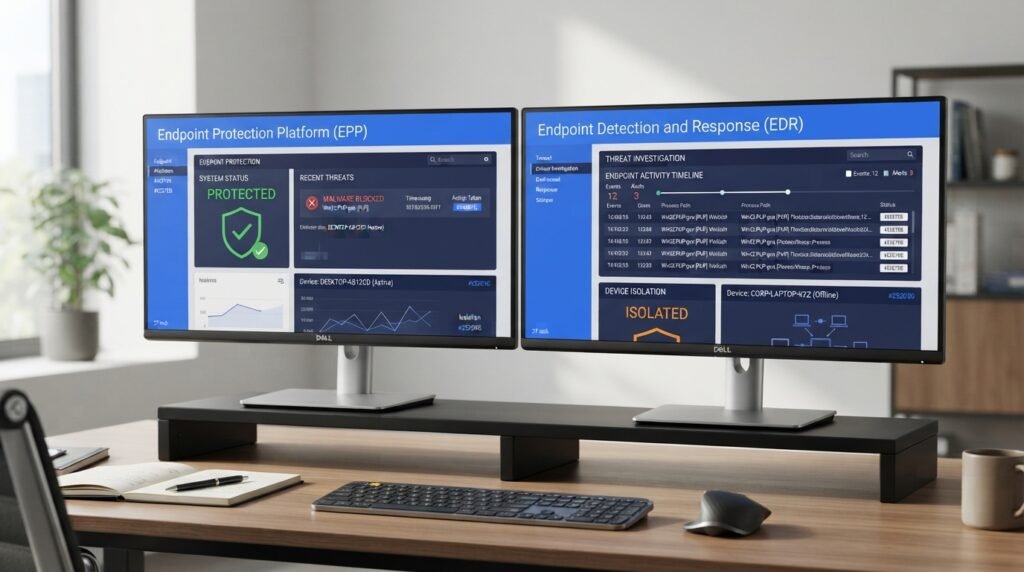
- Endpoint Protection Platform (EPP): Helps prevent threats such as malware, viruses, and harmful applications from infecting devices.
- Endpoint Detection and Response (EDR): Monitors device activity, finds suspicious behavior, investigates threats, and helps security teams respond to attacks.
Although these technologies have different jobs, they work well together.
For example, an employee may receive an email with a harmful attachment. An EPP solution may block the file before it runs. If the file gets past prevention tools, an EDR solution can detect unusual activity, alert the security team, and help isolate the infected computer.
Example 1:
An employee downloads an infected file from an unknown website. The company’s endpoint protection software blocks the file before it can damage the computer.
This example shows how prevention tools help stop threats before they affect a business device.
Example 2:
A harmful program starts running on a company laptop. The EDR system detects unusual activity and alerts the security team.
This example shows how detection and response tools help identify threats that get past basic security controls.
How Does Endpoint Protection and Response Work?
Endpoint protection and response uses security software installed on devices or connected to a central management system.
The software monitors device activity and checks files, applications, and processes for suspicious behavior.

Here is how the process generally works.
1. Monitoring Endpoint Activity
The security software collects information about what happens on each protected device.
It may monitor:
- Running applications
- File activity
- Network connections
- Login attempts
- System changes
- Application behavior
This information helps security teams identify activity that may indicate an attack.
Example 3:
An employee’s laptop suddenly starts connecting to an unknown external server. The security software records this activity and flags it for review.
This may help the security team investigate a connection that could be linked to malware.
2. Detecting Security Threats
The software checks device activity for signs of harmful behavior.
Common detection methods include:
- Signature-based detection: Compares files with known malware patterns.
- Behavior-based detection: Looks for unusual actions that may indicate an attack.
- Machine learning: Uses trained models to identify patterns linked to suspicious activity.
- Threat intelligence: Uses information about known cyber threats to improve detection.
These methods help security systems identify both known and some previously unseen threats.
Example 4:
A program tries to change several system files and access sensitive folders without permission. The security system detects this unusual behavior and creates a security alert.
The alert gives the IT team a chance to check the activity before more damage occurs.
3. Investigating the Threat
After detecting suspicious activity, security teams investigate what happened.
They may check:
- Which device was affected.
- Which user account was involved.
- What file or application started the activity.
- When the suspicious activity began.
- Which other devices may be affected.
- Whether company data was accessed.
This step helps the team find the cause of the incident.
Example 5:
A security alert shows that a suspicious file was downloaded from an email attachment. The IT team checks the file, its source, and the activity that followed the download.
This investigation helps the team decide whether the file is harmful and what action is needed.
4. Containing the Threat
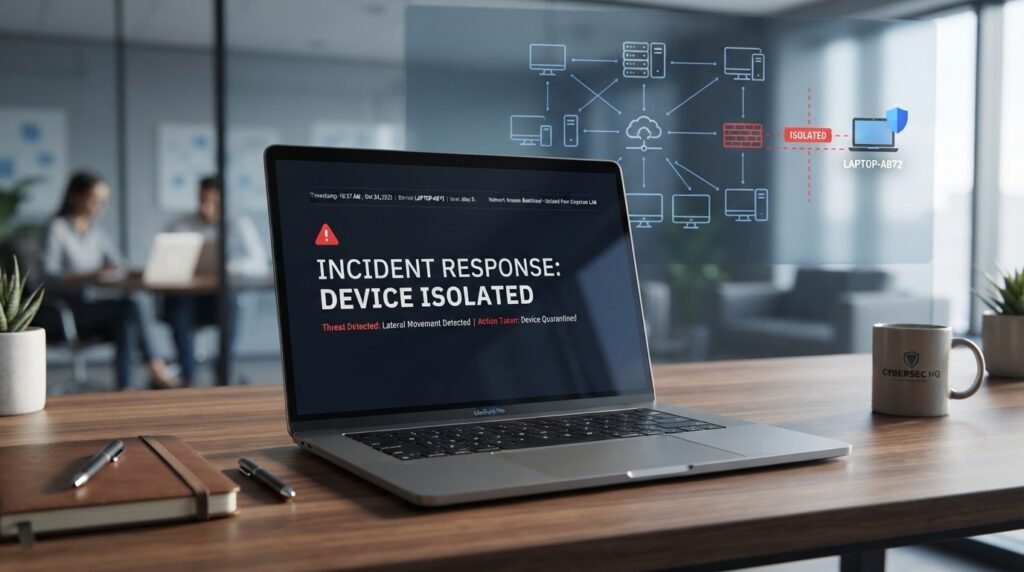
If a device is infected, the security team may isolate it from the company network.
Endpoint isolation limits the device’s ability to communicate with other systems. This can help stop malware from spreading.
Depending on the security product, the team may also:
- Block harmful applications.
- Stop suspicious processes.
- Disable unsafe network connections.
- Restrict access to certain files.
- Temporarily disable an affected user account.
Example 6:
An employee’s laptop shows signs of a ransomware attack. The security team isolates the laptop from the company network to reduce the risk of the attack spreading to shared systems.
Isolation does not remove every threat, but it can help limit the damage.
5. Removing the Threat and Restoring the Device
After containment, the IT team works to remove the threat and restore normal operations.
This may involve:
- Removing harmful files.
- Stopping malicious processes.
- Updating affected software.
- Fixing security weaknesses.
- Resetting exposed passwords.
- Restoring clean files from backups.
- Checking the device for further suspicious activity.
The team should also review the incident to reduce the chance of a similar attack.
Key Features of Endpoint Protection and Response
A good endpoint security solution should offer several features that help protect business devices.
1. Antivirus and Anti-Malware Protection
Antivirus software checks files and programs for known threats. Anti-malware protection helps detect and block harmful software.
These tools can help protect computers against:
- Viruses
- Trojans
- Spyware
- Ransomware
- Worms
- Other malicious programs
For example, an employee downloads a file that contains a known virus. The antivirus tool detects and blocks it before the file can run.
2. Real-Time Threat Monitoring
Real-time monitoring checks endpoint activity as it happens.
This helps security teams spot unusual behavior without waiting for a scheduled scan.
For example, if an application suddenly tries to access sensitive company files, the security system may create an alert.
3. Behavioral Threat Detection
Behavior-based detection looks at what a program does instead of checking only its name or file signature.
This is useful because some harmful programs change their code to avoid traditional antivirus detection.
For example, a program may try to encrypt hundreds of documents in a short time. This behavior could indicate a ransomware attack.
4. Automated Threat Response
Automated response allows security software to take certain actions when it detects a threat.
Depending on the system and its settings, it may:
- Quarantine a harmful file.
- Stop a suspicious process.
- Block a dangerous connection.
- Isolate an affected device.
- Create an alert for the security team.
Automation can help reduce the time between threat detection and action. However, serious incidents may still require human review.
5. Centralized Management
A central management console gives IT teams one place to view and manage protected devices.
They can use it to:
- Check device security status.
- Review threat alerts.
- Apply security policies.
- Manage software settings.
- Investigate incidents.
- Track security activity.
For example, a company with 100 employee laptops can use one management console to monitor security across those devices.
6. Endpoint Isolation
Endpoint isolation helps separate an infected or suspicious device from the rest of the network.
This feature is useful during ransomware attacks and other incidents where malware may spread between connected computers.
The security team can investigate the affected device while limiting its network access.
7. Threat Investigation and Reporting
Security reports help IT teams see what happened during a security incident.
Reports may include:
- Threat type
- Affected devices
- Detection time
- User activity
- Actions taken
- Current incident status
These records can help teams review past incidents and improve security rules.
What Is the Difference Between EPP and EDR?
Endpoint Protection Platform (EPP) and Endpoint Detection and Response (EDR) are two related cybersecurity technologies.
The main difference is their purpose.
An EPP focuses on preventing threats before they infect a device. An EDR focuses on detecting, investigating, and responding to threats that get past prevention tools.
| Feature | EPP | EDR |
|---|---|---|
| Main purpose | Prevent threats | Detect and respond to threats |
| Main focus | Device protection | Threat monitoring |
| Malware blocking | Yes | May include prevention features |
| Activity monitoring | Varies by product | Continuous endpoint monitoring |
| Threat investigation | Limited or product-dependent | Advanced investigation |
| Device isolation | Product-dependent | Common feature |
| Automated response | Varies | Common feature |
| Main users | IT administrators | IT and security teams |
How EPP Works
An Endpoint Protection Platform provides preventive security features.
It may include:
- Antivirus protection
- Anti-malware tools
- Firewall controls
- Application control
- Device control
- Web protection
Example 7:
An employee tries to open a file containing known malware. The company’s EPP software detects the harmful file and blocks it.
This shows how EPP helps prevent known threats from running on business devices.
How EDR Works
An Endpoint Detection and Response system monitors endpoint activity and looks for signs of attacks.
It can help security teams:
- Find suspicious activity.
- Review security alerts.
- Investigate affected devices.
- Isolate compromised computers.
- Remove harmful files.
- Track the progress of an incident.
Example 8:
A harmful application gets past antivirus protection and starts accessing sensitive files. The EDR system detects the unusual activity and alerts the security team.
This shows why EDR is useful even when a business already uses antivirus software.
Can EPP and EDR Work Together?
Yes. EPP and EDR serve different purposes and can work together as part of one endpoint security setup.
EPP helps block threats before they cause damage. EDR helps find and respond to threats that get through.
Using both can give a business better visibility and protection across its devices.
Endpoint Protection and Response vs. Traditional Antivirus
Traditional antivirus software mainly focuses on identifying and blocking known malware.
Modern endpoint security solutions can provide a wider set of features.
| Feature | Traditional Antivirus | Endpoint Protection and Response |
|---|---|---|
| Virus detection | Yes | Yes, depending on the solution |
| Malware blocking | Yes | Yes |
| Behavior monitoring | Limited or product-dependent | Common in advanced solutions |
| Continuous monitoring | Varies | Common with EDR |
| Threat investigation | Limited | Advanced |
| Device isolation | Usually limited | Often available |
| Automated response | Basic or limited | More advanced options |
| Central management | Product-dependent | Common in business solutions |
Traditional antivirus can still protect individual devices, especially for home users.
However, businesses with many devices may need additional monitoring, investigation, and response features.
Benefits of Endpoint Protection and Response
Endpoint protection and response can help organizations reduce security risks and manage threats more effectively.
1. Better Protection Against Cyberattacks
It combines preventive and detective security features.
This helps businesses protect their devices against malware, ransomware, spyware, and suspicious applications.
2. Faster Threat Detection
Continuous monitoring can help security teams find suspicious activity earlier.
Early detection gives the team more time to investigate and limit possible damage.
3. Reduced Risk of Ransomware
Ransomware can encrypt files and prevent users from accessing important data.
Endpoint security tools may detect unusual file activity, block harmful processes, or isolate affected devices.
However, no security product can guarantee complete protection against ransomware.
4. Better Visibility Across Devices
A central management console helps administrators check security activity across multiple endpoints.
This is useful for companies with employees working in different offices or from home.
5. Faster Incident Response
Security alerts and automated actions can help IT teams respond to threats without handling every step manually.
For example, an EDR tool may isolate a compromised laptop while the security team investigates the incident.
6. Support for Remote Employees
Remote employees often use laptops and mobile devices outside the company office.
Endpoint security software helps businesses apply security rules to these devices even when employees work from different locations.
7. Better Security Records
Security reports help organizations review incidents, identify weak points, and improve their security plans.
These records may also support internal audits and security reviews.
Common Threats That Endpoint Protection and Response Can Help Stop
Endpoint security tools can help protect devices against several types of cyber threats.
1. Ransomware
Ransomware is malicious software that locks or encrypts files and demands payment to restore access.
Endpoint security tools may detect suspicious file encryption and help isolate affected devices.
Example 9:
An employee opens a harmful email attachment. The attached program starts encrypting company documents, but the endpoint security system detects the activity and isolates the laptop.
This response may limit the damage, although the business must still investigate and restore affected data.
2. Malware
Malware is software created to damage devices, steal information, or gain unauthorized access.
Examples include viruses, spyware, Trojans, and worms.
Endpoint protection software can scan files, block known malware, and monitor suspicious application activity.
3. Phishing Attacks
Phishing happens when attackers use fake emails, websites, or messages to trick people into sharing private information.
Some endpoint security tools can block harmful links and suspicious downloads.
However, employee awareness and email security are also needed to reduce phishing risks.
4. Spyware
Spyware is software that secretly collects information from a device.
It may track user activity, collect login details, or access private information.
Security tools can help detect and remove known spyware and suspicious programs.
5. Unauthorized Applications
Some applications may create security risks because they are unsafe, outdated, or not approved by the company.
Application control can help administrators restrict which programs employees are allowed to install or run.
6. Fileless Malware
Fileless malware uses trusted system tools or memory-based activity to carry out harmful actions.
Because it may not rely on a traditional malicious file, behavior monitoring can help detect suspicious activity.
How to Choose an Endpoint Protection and Response Solution
Choosing the right endpoint security solution depends on the size of your organization, the number of devices, your security needs, and your budget.
Here are some features to check before selecting a product.
1. Device Compatibility
Check whether the software supports the operating systems used by your organization.
Common systems include:
- Windows
- macOS
- Linux
- Android
- iOS
Not every product supports every operating system or feature.
2. Threat Detection Features
Look for tools that offer malware detection, behavior monitoring, and threat investigation.
These features can help identify both known threats and suspicious activity.
3. Automated Response Options
Check whether the software can quarantine files, stop harmful processes, and isolate affected devices.
Also check which actions happen automatically and which require administrator approval.
4. Centralized Management
A central dashboard can make it easier to manage many devices.
Look for clear reports, useful alerts, device status information, and simple policy controls.
5. Cloud and On-Premises Options
Some endpoint security solutions use cloud-based management, while others support on-premises systems.
Cloud-based tools can be useful for organizations with remote employees. On-premises options may suit businesses with specific infrastructure or control needs.
6. Integration With Other Security Tools
Check whether the product works with your existing security systems.
Useful integrations may include:
- Security Information and Event Management (SIEM)
- Extended Detection and Response (XDR)
- Identity and access management tools
- Email security platforms
- Network security systems
7. Customer Support and Training
Good support can help your team install, manage, and troubleshoot the software.
Check the available support hours, training resources, documentation, and service options.
8. Pricing and Licensing
Compare the total cost instead of looking only at the starting price.
Check:
- Per-device or per-user pricing.
- Annual subscription costs.
- Server protection fees.
- Advanced feature costs.
- Support charges.
- Contract requirements.
A small business may need a different plan from a large organization with hundreds of endpoints.
Popular Endpoint Protection and Response Solutions
Several cybersecurity companies offer endpoint protection, detection, and response products.
Here are some well-known options to research.
1. Microsoft Defender for Endpoint
Microsoft Defender for Endpoint provides endpoint security features for organizations using supported Microsoft environments.
Its features include threat detection, investigation, device protection, and response tools.
It may suit businesses that already use Microsoft security and management products.
2. CrowdStrike Falcon
CrowdStrike Falcon is an endpoint security platform that offers threat detection, investigation, and response features.
Organizations can use its products to monitor endpoint activity and respond to suspicious behavior.
It offers different service levels for different business needs.
3. SentinelOne Singularity
SentinelOne Singularity provides endpoint security features, including threat detection and automated response.
Its platform can help organizations monitor devices, investigate threats, and respond to security incidents.
4. Sophos Endpoint
Sophos Endpoint combines endpoint protection features with threat detection and response capabilities.
It offers tools for organizations that need to protect computers and servers.
5. Palo Alto Networks Cortex XDR
Cortex XDR helps security teams investigate threats across connected security sources.
It can combine endpoint information with signals from other parts of an organization’s security setup.
Note: Product features, supported devices, plans, and prices can change. Check the current product details before choosing a solution. No single product is the best fit for every organization.
Endpoint Protection and Response Best Practices
Buying security software is only one part of protecting business devices.
Organizations should also follow basic security practices.
1. Keep Software Updated
Install security updates for operating systems, browsers, and business applications.
Updates often fix weaknesses that attackers may use to access devices.
2. Use Strong Passwords
Employees should use strong, unique passwords for business accounts.
A password manager can help them create and store secure passwords.
3. Enable Multi-Factor Authentication
Multi-Factor Authentication (MFA) requires users to provide an additional form of verification when signing in.
For example, an employee may need a password and an approval request from an authentication app.
This can reduce the risk of unauthorized account access.
4. Limit User Permissions
Give employees access only to the systems and files they need for their jobs.
Avoid giving standard users administrator permissions without a clear reason.
5. Train Employees
Teach employees how to recognize suspicious emails, unsafe downloads, and fake websites.
They should also know how to report a possible security incident.
6. Back Up Important Data
Keep regular backups of important business files.
Store backups separately from the main network when possible, and test them to make sure files can be restored.
7. Review Security Alerts
IT teams should review security alerts and investigate suspicious activity.
Ignoring alerts can allow a small problem to become a larger incident.
8. Test Your Incident Response Plan
Create a written plan that explains who should respond to an attack and what steps they should follow.
Run practice exercises to check whether employees and IT staff know their roles.
Is Endpoint Protection and Response Necessary for Small Businesses?
Yes, small businesses can benefit from endpoint protection and response because they also face risks from malware, ransomware, phishing, and stolen login details.
A small company may have only a few laptops, but those devices can still store customer information, financial records, and business files.
The right security setup depends on the company’s size and risk level.
A small business can start with:
- Business-grade endpoint protection.
- Automatic software updates.
- Multi-factor authentication.
- Regular data backups.
- Limited user permissions.
- Basic employee security training.
Businesses with sensitive data or limited IT staff may also consider managed endpoint detection and response (MDR).
A managed service provider can monitor security alerts and help investigate threats. The exact services depend on the provider and contract.
Example 10:
A small accounting firm has eight employee laptops. One employee downloads a suspicious attachment. The endpoint security system detects the threat, and the IT support provider helps isolate the affected laptop.
This example shows how a small business can use endpoint security and outside IT support to respond to a possible attack.
What Is the Difference Between EDR, XDR, and MDR?
These three terms are related, but they describe different security tools or services.
Endpoint Detection and Response (EDR)
EDR monitors endpoint activity to detect, investigate, and respond to threats affecting devices.
Its main focus is computers, laptops, servers, and other supported endpoints.
Extended Detection and Response (XDR)
XDR combines security information from multiple sources, such as endpoints, networks, email systems, and cloud services.
This gives security teams a wider view of possible attacks.
Managed Detection and Response (MDR)
MDR is a managed security service. It provides access to security tools and trained analysts who monitor, investigate, and help respond to threats.
A business can use MDR when it does not have enough in-house security staff.
| Technology | Main Focus | Main Purpose |
|---|---|---|
| EDR | Endpoints | Detect and respond to device threats |
| XDR | Multiple security sources | Connect and investigate threats across systems |
| MDR | Managed security service | Provide expert monitoring and response |
These services can work together. For example, an organization may use EDR software while a managed security provider handles monitoring and incident response.
FAQs About Endpoint Protection and Response
What does endpoint protection and response mean?
Endpoint protection and response refers to security tools and processes that protect connected devices, detect suspicious activity, and help organizations respond to cyber threats. It often combines EPP prevention features with EDR detection and response capabilities.
Is endpoint protection the same as EDR?
No. Endpoint protection is a broad term for security measures that protect devices. EDR is a specific technology that monitors endpoint activity to detect, investigate, and respond to threats.
What is the main purpose of endpoint protection and response?
Its main purpose is to protect business devices from cyber threats and help security teams identify and contain attacks. It can also help reduce the risk of data loss and system disruption.
Does endpoint protection replace antivirus software?
Not always. Many endpoint protection platforms include antivirus and anti-malware features. They may also provide application control, behavior monitoring, and other security tools.
Can endpoint protection stop ransomware?
Endpoint security software can help detect and block some ransomware attacks. It may also isolate infected devices to limit damage. However, no product can guarantee that every ransomware attack will be stopped.
What is the difference between EPP and EDR?
EPP focuses on preventing threats before they run on a device. EDR monitors device activity and helps detect and respond to threats that get past prevention tools.
Do small businesses need EDR?
Small businesses may benefit from EDR, especially if they store customer information or depend on computers for daily work. Their needs depend on their size, risk level, budget, and available IT support.
How does endpoint detection work?
Endpoint detection monitors device activity and checks for suspicious behavior. It can use file analysis, known threat information, behavior monitoring, and other detection methods to identify possible attacks.
What is managed endpoint detection and response?
Managed Endpoint Detection and Response (MDR or managed EDR) generally refers to endpoint detection tools operated or supported by an outside security provider. The provider may monitor alerts, investigate incidents, and help the business respond.
What devices need endpoint protection?
Devices that connect to a business network may need protection. These include desktop computers, laptops, servers, tablets, and supported mobile devices.
Conclusion
Endpoint protection and response helps businesses protect their computers, laptops, servers, and other connected devices from cyber threats.
It combines prevention with threat detection, investigation, and response. EPP helps block known threats, while EDR helps find and respond to attacks that get past prevention tools.
For businesses, a good endpoint security setup should include regular software updates, strong passwords, multi-factor authentication, data backups, and employee training.
Choose a solution based on your devices, security needs, budget, and IT resources. The right combination of security tools and good practices can help reduce risks and protect important business information.

Emily Carter (Content Writer & Communication Specialist) is a content writer and communication specialist at AllTypeInfo.com. She writes clear, practical, and easy-to-follow guides on email responses, message replies, writing templates, and everyday communication tips. Her goal is to help readers communicate with confidence in both personal and professional settings.