Ending an email can be tricky when you need the other person to reply. You may want an answer, approval, feedback, or a decision, but you do not want to sound demanding. A vague closing can leave the reader unsure about what to do next, while a clear and polite sentence makes your request easier to follow.
The best way to end an email that requires a response is to state what you need, thank the reader when appropriate, and give a deadline if one matters. Your final sentence should match your relationship with the recipient. Whether you are emailing your manager, a client, a coworker, or a recruiter, the right closing can help you communicate clearly and professionally.
Key Takeaways
- State exactly what response you need.
- Use polite, direct closing sentences.
- Set a deadline when necessary.
- Choose a sign-off that fits the situation.
- Thank the reader when it feels natural.
- Make your question easy to answer.
- Follow up politely if the reply is delayed.
How to End an Email That Requires a Response
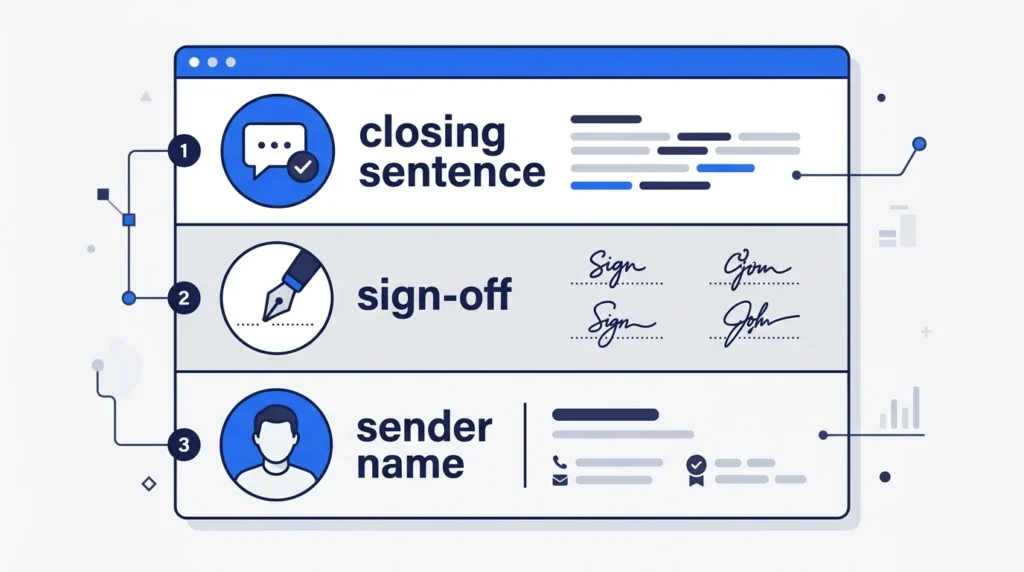
A good email ending has three parts: a closing sentence, a sign-off, and your name. The closing sentence tells the reader what you need. The sign-off sets the tone, and your name completes the message.
For example:
Could you please confirm your availability by Thursday? Thank you for your help.
Best regards, Alex Johnson
This ending works because it states the request, gives a clear deadline, and stays polite.
1. State What You Need From the Reader
Avoid vague endings that do not explain what you expect. Tell the recipient whether you need an answer, approval, feedback, or confirmation.
Examples:
- Please confirm whether the proposed date works for you.
- Could you share your feedback on the attached document?
- Please let me know which option you prefer.
- Could you confirm receipt of the report?
- Please share your decision when you have a chance.
Quick Tip: Ask one clear question instead of making the reader guess what you need.
2. Keep Your Tone Polite and Professional
You can ask for a reply without sounding impatient. Use respectful language and avoid giving orders unless your role or the situation calls for direct instructions.
For example, instead of writing “Reply as soon as possible,” try:
Could you please send me your response by Friday? I appreciate your help.
This sentence explains the deadline without sounding harsh.
3. Add a Deadline When It Matters
If you need a response before a meeting, project, or decision, state the date clearly. A deadline helps the reader plan and lets them know when you need the answer.
Examples:
- Could you please respond by Wednesday afternoon?
- I would appreciate your feedback by October 20.
- Please confirm your attendance by Friday.
- Could you share your approval before the meeting on Monday?
Only set a deadline when there is a real reason for one. If the request is not urgent, a simple request for feedback may be enough.
4. Choose the Right Sign-Off
Your sign-off comes after the closing sentence. Choose one that fits your relationship with the recipient.
| Sign-off | Best use |
|---|---|
| Best regards, | Professional emails and client communication |
| Kind regards, | Polite, formal communication |
| Sincerely, | Formal requests and first-time contact |
| Thank you, | Requests for help or action |
| Best, | Everyday workplace emails |
| Thanks, | Friendly requests to coworkers |
| Warm regards, | Professional relationships with a warmer tone |
For most work emails, Best regards and Thank you are safe choices.
Best Email Closing Lines That Require a Reply
The right closing line depends on the type of response you need. Here are practical examples you can copy and adjust.
Polite and Professional Closing Lines
Use these when writing to a manager, client, colleague, or business contact.
- I look forward to hearing your thoughts.
- Please let me know your decision when convenient.
- I would appreciate your feedback on this matter.
- Could you please confirm the next steps?
- Thank you for taking the time to review this.
- I look forward to your response.
- Please let me know if you need any additional information.
Closing Lines That Request a Quick Reply
Use these when you need an answer soon but want to remain respectful.
- Could you please get back to me by the end of the day?
- I would appreciate a response as soon as you can.
- Please confirm by noon tomorrow so I can proceed.
- Could you share your decision before our meeting?
- Your reply by Friday would help us stay on schedule.
Closing Lines for Feedback or Approval
Use these when someone needs to review your work or make a decision.
- I would appreciate your feedback on the attached proposal.
- Please let me know if you approve the revised version.
- Could you review the document and share your comments?
- Please confirm whether I can move forward with this plan.
- I look forward to hearing your thoughts on these options.
Friendly Closing Lines
These work well with coworkers, familiar clients, and people you communicate with often.
- Let me know what you think when you have a chance.
- Thanks for taking a look. I look forward to your thoughts.
- Please send me a quick update when you can.
- Let me know if this works for you.
- Thanks again. I look forward to hearing from you.
How to End an Email in Different Situations
A closing sentence should reflect the purpose of your email. The examples below show how to adjust your wording for common situations.
1. Email to Your Manager
When emailing your manager, be clear about the decision or approval you need. Keep the tone respectful and make the next step easy to follow.
Example:
Could you please review the attached report and let me know if you approve it by Thursday?
Thank you, [Your Name]
2. Email to a Client
Client emails should sound professional and helpful. State what you need from the client without making the request feel like a demand.
Example:
Please let me know which option best fits your needs so we can move forward.
Best regards, [Your Name]
3. Email to a Coworker
With coworkers, a natural and direct closing usually works well. You can use a friendly tone while keeping the request clear.
Example:
Could you send me the updated file before our meeting tomorrow?
Thanks, [Your Name]
4. Email to a Recruiter
When contacting a recruiter, show interest and ask about the next step without sounding impatient.
Example:
Thank you for considering my application. I would appreciate any updates on the next steps in the hiring process.
Best regards, [Your Name]
5. Email Requesting a Meeting
If you want to arrange a meeting, ask the recipient to confirm a date or choose from specific times.
Example:
Would Tuesday at 10 a.m. or Wednesday at 2 p.m. work for you? Please let me know which time you prefer.
Best, [Your Name]
6. Email Requesting Information
Make the information you need clear. If possible, explain when you need it.
Example:
Could you please share the updated figures by Friday? This will help me finish the report on time.
Thank you, [Your Name]
7. Email Requesting Approval
Ask for approval directly and explain what happens after the recipient responds.
Example:
Please confirm whether I can proceed with the proposed changes. Once approved, I will begin the next stage.
Kind regards, [Your Name]
8. Follow-Up Email After No Response
If you have already sent an email and received no reply, keep your follow-up calm and brief. The recipient may have missed your message or may still be reviewing the request.
Example:
I wanted to follow up on my previous email about the project timeline. Could you please share an update when you have a chance?
Best regards, [Your Name]
Avoid blaming the reader or suggesting that they ignored you on purpose.
Complete Email Examples You Can Copy
These examples show how to use a response-focused closing within a full email.
Example 1: Requesting a Reply by Friday
Subject: Feedback on the Project Proposal
Hi [Name],
I have attached the updated project proposal for your review. Could you please check the proposed timeline and share any feedback?
I would appreciate your response by Friday so I can make the final changes.
Thank you for your time.
Best regards, [Your Name]
Example 2: Asking a Manager for Approval
Subject: Approval Needed for the Updated Plan
Hi [Manager’s Name],
I have revised the plan based on our last discussion. The updated version includes the new timeline and estimated costs.
Could you please review it and confirm whether I can proceed?
Thank you, [Your Name]
Example 3: Requesting a Client’s Decision
Subject: Confirmation of Your Preferred Option
Hi [Client’s Name],
I have outlined the two options we discussed. Both are included in the attached document for easy comparison.
Please let me know which option you prefer by Wednesday so we can plan the next steps.
Best regards, [Your Name]
Example 4: Asking a Coworker for an Update
Subject: Update on the Weekly Report
Hi [Name],
I am preparing the weekly report and need the latest figures from your team.
Could you please send me the updated numbers by tomorrow afternoon?
Thanks for your help.
Best, [Your Name]
How to Make Your Email Ending More Effective
A few small changes can make your request clearer and easier to answer.
Ask a Specific Question
A clear question gives the reader a direct task.
Weak: Let me know your thoughts.
Better: Could you review the first two options and tell me which one you prefer?
Make the Reply Easy
If the reader has to make a complicated decision, offer simple choices.
Instead of asking, “What is your availability?” try:
Would Monday at 11 a.m. or Tuesday at 3 p.m. work better for you?
This gives the reader a simple way to reply.
Explain Why You Need the Answer
A short reason can help the recipient see why a reply matters.
For example:
Could you confirm the final price by Thursday? I need it to complete the client estimate.
Keep the explanation brief and relevant.
Use a Realistic Deadline
Give the reader enough time to review your request. If the matter is urgent, explain the reason and state the exact time you need an answer.
Thank the Reader Naturally
A simple thank-you can make your message sound courteous.
Good examples include:
- Thank you for your time.
- I appreciate your help with this.
- Thanks for reviewing the document.
Avoid wording that assumes the reader has already agreed to your request.
Common Mistakes to Avoid
Even a well-written email can become less clear if the ending is too vague, forceful, or informal.
| Mistake | Better alternative |
|---|---|
| Reply ASAP. | Could you respond by 3 p.m. today? |
| Waiting for your reply. | I look forward to hearing your thoughts. |
| Let me know. | Please confirm whether Friday works for you. |
| I need this immediately. | Could you send this by noon? We need it for today’s meeting. |
| Thanks in advance for agreeing. | Thank you for considering my request. |
| Please respond at your earliest convenience. | Could you share your response by Thursday? |
Avoid These Habits
- Do not use all capital letters to demand a reply.
- Do not add several questions to your closing.
- Do not set an unnecessary deadline.
- Do not use casual language with an unfamiliar client.
- Do not repeat the same request several times.
- Do not make the reader feel guilty for a delayed reply.
Quick Checklist Before Sending Your Email
Use this checklist to review your closing.
- Have I stated what response I need?
- Is my question clear and specific?
- Have I included a deadline if needed?
- Does my tone fit the recipient?
- Have I explained the reason for urgency?
- Is my sign-off appropriate?
- Have I included my name and signature?
- Have I checked the email for errors?
Frequently Asked Questions
1. What is the best way to end an email that requires a response?
Use a polite closing sentence that clearly states what you need. For example, “Could you please confirm by Friday? Thank you for your help.” Add a suitable sign-off, such as “Best regards.”
2. How do I politely ask someone to reply to an email?
Ask directly without sounding demanding. You can write, “I would appreciate your response when you have a chance,” or “Could you please share your thoughts by Thursday?”
3. How do I end an email when I need an urgent response?
State the exact deadline and briefly explain why the answer is needed. For example, “Could you please confirm by 2 p.m. today so we can finalize the schedule?”
4. Should I write “I look forward to hearing from you”?
Yes. This is a polite, common closing for professional emails. It works well when you expect a reply but do not need to set a firm deadline.
5. Is “Thanks in advance” appropriate in a professional email?
It can be appropriate for routine requests. However, it may sound as if you expect the recipient to agree. “Thank you for considering my request” is a good alternative when the decision is still open.
6. How do I end an email asking for feedback?
Ask for feedback directly and mention the item you want reviewed. For example, “I would appreciate your feedback on the attached proposal by Friday.”
7. How do I end an email without sounding pushy?
Use respectful wording, explain your request clearly, and give a deadline only when needed. Avoid commands such as “Reply immediately” unless there is a genuine emergency that requires direct language.
8. What should I write at the end of a follow-up email?
Briefly refer to your earlier message and ask for an update. For example, “I wanted to follow up on my previous email. Could you please let me know if there are any updates?”
Conclusion
Knowing how to end an email that requires a response helps you communicate clearly and professionally. State what you need, use a polite closing sentence, and include a realistic deadline when necessary. Choose a sign-off that fits the recipient and the situation.
For most professional emails, a simple line such as “Could you please confirm by Friday? Thank you for your help” works well. It tells the reader what to do without adding pressure. Clear requests, short sentences, and respectful wording make your emails easier to answer.

Emily Carter (Content Writer & Communication Specialist) is a content writer and communication specialist at AllTypeInfo.com. She writes clear, practical, and easy-to-follow guides on email responses, message replies, writing templates, and everyday communication tips. Her goal is to help readers communicate with confidence in both personal and professional settings.